AINews wire, 24 Nov 2026
Using a local AI model to build shell aliases from six months of history
Reported by XDA Developers
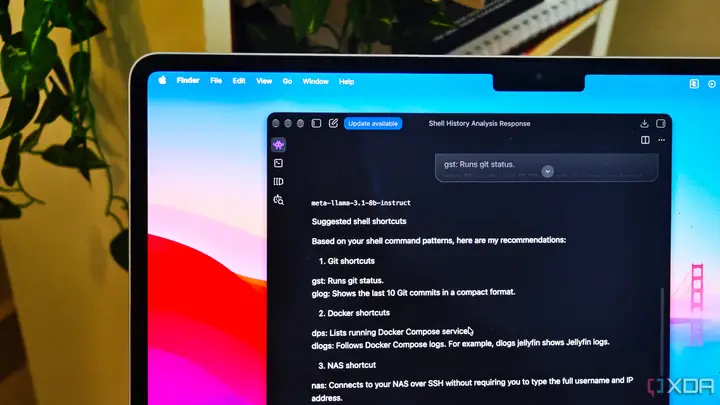
A writer at XDA Developers gave six months of terminal history to a local language model and asked it to find repeated commands and suggest shortcuts. The model produced aliases and functions that the writer says they should have created years earlier. The article was published on 24 November 2026.
The data came from Zsh, which is the default shell on macOS and stores its command history in a file in the home folder. The writer notes that the file may not hold every command you ran, because the number of saved entries depends on your settings. Zsh can also record timestamps, which helps isolate a specific period. History can contain server addresses, tokens and passwords typed straight into commands, so the writer advises reviewing and removing those lines before any processing. Running the model locally meant the history never went to a cloud service.
The suggestions included short Git aliases: gst for checking status and glog for a compact view of the last ten commits. For Docker Compose, which the writer uses to run Jellyfin, Immich and Nextcloud on a home server, the model proposed dps for listing containers and dlogs for following logs. A shorter name, nas, wraps the SSH connection to the NAS. The most useful result was a function that moves into the Immich project folder and streams its logs in one step. The model found this pattern because the same sequence appeared many times in the history.
The writer also warns against keeping everything the model proposes. Short commands gain little from an alias, and a long list of aliases is hard to remember. Some names can clash with existing commands, and others only work in a particular directory. This matters most with Docker, where a command that works in one project may fail in another. The writer also advises against shortcuts for destructive actions, such as anything that deletes files, removes volumes or resets configuration.
To adopt the useful ones, the writer adds the chosen aliases and functions to the .zshrc file and reloads it with the source command. Each shortcut should be tested in the terminal and adjusted if needed. After a week or two of normal use, any alias that is forgotten or still bypassed by typing the full command should be removed.
The writer also finds that small local models work well for narrow, repeatable jobs, and describes one such daily task. The article does not name the model, its hardware, or how it was set up beyond running locally. It also does not report a systematic comparison with other tools or with cloud models, so the results reflect one user's experiment.
Enjoying this? Get the AI brief
Every Thursday: AI that matters for your home.
✓ Free · seven editions · one click to leave
Original reporting by the sources above. Summary by smart-home.space.