AINews wire, 6 Nov 2026
Turning a gaming GPU into a home AI server: one command and a 35B model
Reported by XDA Developers, TechRadar
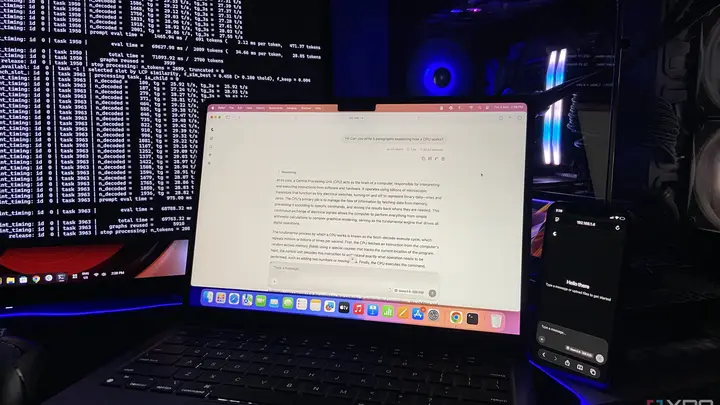
XDA Developers reports that a reviewer turned a desktop PC with an NVIDIA RTX 4070 Ti Super into a local AI server that other devices in the house can use. The setup uses llama.cpp, a runtime for running AI models on your own hardware, and the model is Qwen3.6-35B-A3B in a compressed version from Unsloth. The author says none of the other devices in the house could run this model on their own. The piece is a personal test, not a product launch, and the model makers were not part of it.
The key step is one command in PowerShell. A flag tells the server to listen on the home network instead of only on the host PC. The article also sets a fixed port, 8080, and notes that the project's default port is due to change in a later release. The other settings stay at their defaults, which split the context into slots so that several users can chat at the same time.
The model is about 17.7GB, more than the 16GB of VRAM on the card. To fit it, the author moves the expert weights of the first eight layers into system RAM and keeps the rest on the GPU. The context window is set to 32K, and the server runs two chat slots that share that context. The test machine also had a Ryzen 5 7600X and 32GB of DDR5 memory. The author notes that only about 3 billion of the model's 35 billion parameters are active at a time, which is why splitting the experts across memory keeps it reasonably fast.
Speed was tested with a prompt asking the model to write five paragraphs on how a CPU works. The author ran it from a fresh chat on each device, first one device at a time and then all at once. The article says client devices get about the same speed as the host. The reason is that the server streams only text, not video frames, so the traffic is a small fraction of a megabit per second. The author reports about 90 tokens per second and a short delay of a few milliseconds before the first word appears in the browser. This differs from game streaming tools that send every frame.
Running the server has a cost in VRAM. With the model loaded and waiting, the GPU drew about 14W according to nvidia-smi. During active generation it rose to 130 to 140W and then dropped back once the reply was sent. The VRAM was about 96 percent full, using 15.4GB of the 16GB available, which leaves roughly 0.6GB spare. The author says that figure depends on the model. Lighter models, or moving more expert layers into system RAM, leave more room. The author adds that the ideal setup is a dedicated headless home server, especially one with several GPUs.
The same week, Tom's Guide published a column on the AI market and memory prices. It reports that tech valuations fell sharply in one day, and that voters rejected data centre expansion in 40 of 41 local ballot measures. The headline gives the market loss as $2 trillion, while the article text gives $2.5 trillion, so the figures differ between the two parts of the same piece. The columnist, Jason, argues that memory and GPU shortages may ease in phases through 2027, with a peak possibly this spring. He suggests the local AI boom could come in the second half of 2027. These are the author's predictions, not confirmed outcomes, and the column does not give new price data.
Several points remain unknown. The XDA results come from one author using one GPU and one model, so the speeds may differ on other hardware. The article does not say how the setup performs with many users at once beyond the two slots tested. The Tom's Guide forecast on memory prices is opinion, and the sources do not show that consumer prices have started to fall.
For readers with a smart home, the main point is that an idle gaming PC may be able to act as a home AI server for other devices on the network, with no cloud subscription. The cost is VRAM, which can be almost fully used, so the PC may be slow for other GPU tasks while the server runs. The columnist suggests that buyers hold off on PC upgrades for now, which is his view and not an established fact. Anyone who wants to try the setup should check their VRAM first, confirm the model fits, and keep the server on a stable home network.
Enjoying this? Get the AI brief
Every Thursday: AI that matters for your home.
✓ Free · seven editions · one click to leave
How each source covered it
Original reporting by the sources above. Summary by smart-home.space.