AINews wire, 20 Nov 2026
Claude Code set up trusted HTTPS for a home lab in 20 minutes
Reported by XDA Developers
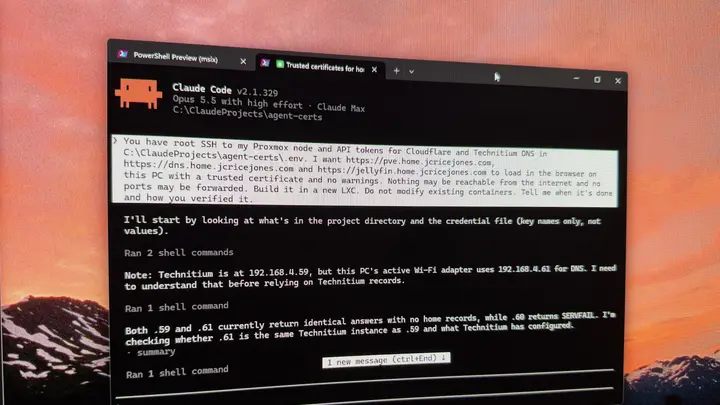
An independent tester gave Claude Code direct access to a Proxmox home server and asked it to set up trusted HTTPS for three internal addresses. The source is an XDA Developers first-person account, so the details below are the author's own report and have not been checked independently.
The author had done the same job by hand in September, over most of a weekend, using Claude in a chat window and copying commands into a terminal. This time Claude Code ran the commands on the server itself. The author reports that the task took 20 minutes from the prompt to a working padlock in the browser.
Access was limited on purpose. Claude Code had root SSH access to the Proxmox node, and a Cloudflare API token that could edit DNS records on one domain only. It also had a token for the Technitium local DNS tool. The author did not connect any extra server tooling. The prompt set three limits: nothing reachable from the internet, build everything in a new container, and do not modify existing containers.
The author first had to block Claude Code from using a skill that held notes from the September build. Without this block, the tool read those notes and followed them. The author started the session with a flag that disabled the skill tool, and checked the permissions screen before running the test again.
The run ended with a new container running nginx and certbot. It obtained a wildcard certificate from Let's Encrypt through a DNS challenge using Cloudflare, created the DNS zone on the Technitium cluster, and added a firewall that accepts web traffic only from the home network. The author's own check found that the three names resolved privately, had no public record, and served a certificate that Windows trusts. The first report from the tool arrived about 14 minutes and 34 seconds into the run.
The tool chose certbot rather than Caddy. The author had expected Caddy problems based on September, so the test did not cover those traps. Claude Code also tested against Let's Encrypt's staging servers before requesting a real certificate, without being asked.
Some steps failed on the first attempt. The firewall rules did not load at first, and the tool found this by reading the active ruleset back. A token file had extra characters, and remote commands broke on PowerShell quoting, so the tool moved the logic into script files on the server. The author also reports that the new container had picked up a public IPv6 address, which the tool then closed off.
The tool ran in auto mode, so the author approved no actions. It blocked one command that tried to read a secret file, and it rewrote that file through a script instead. The Jellyfin address did not fully work. The author says the Jellyfin container has not run since November 8 because of a graphics device setting. The fix would have meant editing an existing container, so the tool stopped and asked. The author's reply, a single letter typed into the wrong window, was read as no.
The author says the safety came from a scoped token, the default refusal to read secrets, and the limit against changing existing containers. The rollback list the tool produced did not cover some saved notes on the author's PC. Other points are the author's own claims and remain unverified.
Enjoying this? Get the AI brief
Every Thursday: AI that matters for your home.
✓ Free · seven editions · one click to leave
Original reporting by the sources above. Summary by smart-home.space.