AINews wire, 1 h ago
Running a 2B vision model on a phone to keep screenshots off chatbot servers
Reported by XDA Developers
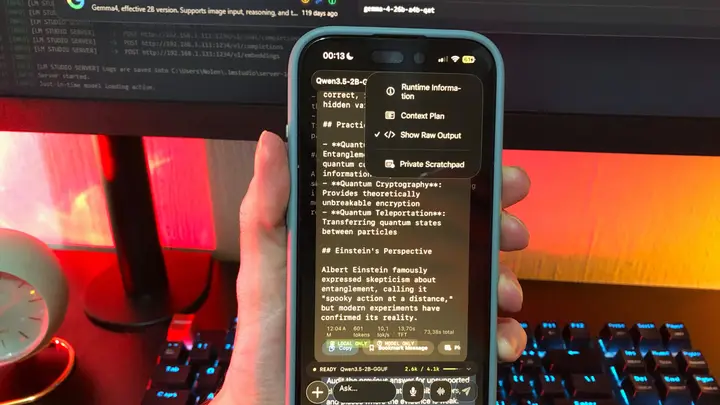
A developer writing on XDA Developers says he now analyses most of his screenshots with a small vision model on his phone, and sends them to cloud chatbots only when he has a clear reason. The piece is a first-person account, not an independent test, so its details reflect one user's setup.
The central concern is data handling. Images uploaded to a chatbot fall under each provider's retention and training rules, and those rules depend on the company and on the user's settings. The author points to OpenAI's consumer plans, where a model-improvement option can be switched off, and to Anthropic, which can keep chats for a long period when the user has agreed to training. He gives his reading of these policies. The article does not quote current terms, so readers should check the policy pages themselves.
Vision models read text well, including small text such as a notification banner visible at the moment of capture. A screenshot therefore carries every word on screen, not only the part the user meant to share. The author lists the images he keeps off cloud services: group chats, which contain other people's messages; money details; work dashboards or internal Slack threads, which employers may bar from consumer AI apps; boarding passes with booking references and barcodes; and health test results.
Local models have a privacy limit too. The author notes that a local app may still send telemetry, offer optional cloud sync, or rely on remote services, so the app and its settings matter. Running the model on the phone does greatly reduce uploads to third-party servers, and that is his main reason for the change.
His setup uses free tools. Noema is his main mobile runner, which he describes as the closest match to cloud apps for workspace features such as web search, file attachments and image upload. For Android he recommends Google AI Edge Gallery. He runs two models. Qwen 3.5 2B, in a 4-bit compressed version called Q4_K_M, handles most screenshots, especially text reading and images that need reasoning or maths. Gemma 4 E2B, which he has used in PocketPal for months and now also runs in Edge Gallery, suits creative work such as design ideas and inspiration. He calls Qwen the smart one and Gemma the fun one.
He keeps Noema's settings simple. Context is set to about 16k tokens, which he says is half of what he uses on his PC. Web, Memory and Search My Chats are turned on. Thinking or reasoning is normally off so it does not use up the context budget, but he sets it to Low or Medium for complex images. Edge Gallery has no web search, but it exposes settings such as temperature and Top-P.
His routine is short. He attaches a screenshot from Photos and asks for a specific result, for example every date and amount listed in a table. He then copies the output into Obsidian for mobile and usually deletes the screenshot from his camera roll. Cloud bots still have a place for tasks that need more capability. When he studies a topic, he prefers Claude because he does not trust a 2B model to explain it fully. Before he sends any shot to a cloud bot, he runs it through the local model first to find private details he may have missed, such as a full name, and then crops or blurs them.
The author also points to a broader habit problem. Most people's screenshot albums hold old boarding passes and group chats they have forgotten saving, and he suspects many of those images have already been uploaded to a chatbot at least once. He now deletes his screenshots once the local analysis is done, which he says keeps his phone more private and stops him hoarding personal images.
Several points remain unclear. The article contains no benchmark, no measured privacy audit, and no independent check of how the named apps handle data beyond the author's own review. It also does not say whether his results would carry over to other phones, memory sizes or model versions. Readers who want to try the approach should test the app's network activity and settings on their own device first.
Enjoying this? Get the AI brief
Every Thursday: AI that matters for your home.
✓ Free · seven editions · one click to leave
Original reporting by the sources above. Summary by smart-home.space.