EV & MobilityNews wire, 15 h ago
Four sideloaded apps add mirroring, a browser and YouTube to Android Auto
Reported by XDA Developers
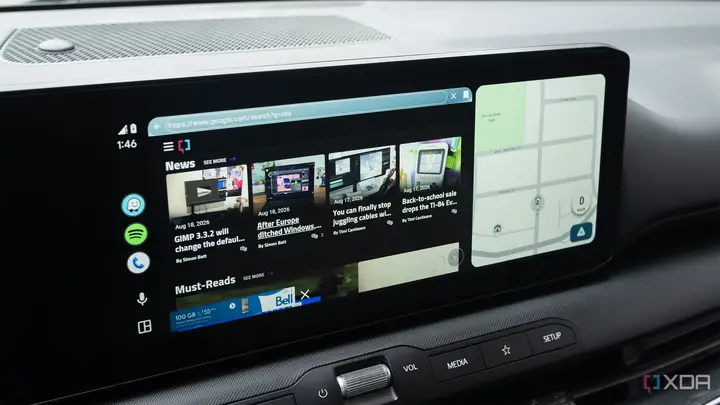
XDA Developers reports on four unofficial apps for Android Auto that Google does not allow in the Play Store. The apps are Screen2Auto, AABrowser, CarStream and Xtream Player. Together they add features the official app lacks: mirroring a phone screen, a full web browser and YouTube access. The author tested each one in a car and warns that none of them should be used while driving.
Screen2Auto mirrors whatever is open on the phone onto the car's display. The tester found it unreliable and said it crashes often, although it is impressive when it works. Setup takes several steps and permissions, including display over other apps and a restricted-settings toggle that only appears in some cases. The app can be installed through AAAD, a storefront for sideloaded car apps.
AABrowser gives the car screen a web browser with a full address bar, back and forward buttons and favourites. The reviewer called it reliable for a sideloaded app, with some lag when using the car's touchscreen. It is available on GitHub and can also be installed through AAAD.
CarStream adds YouTube to the car screen. In the test, videos sometimes stalled while buffering. The reviewer could not sign in to a personal YouTube account, because the login either showed an error or froze the screen. No working GitHub version was found at the time, so AAAD is the only installation route the article mentions.
Xtream Player is the reviewer's favourite. It includes a browser, a way to connect to self-hosted platforms and internet radio. Signing in to YouTube worked, and subscriptions, recommendations and viewing history were available. However, a pop-up claimed the car was not parked, which blocked video playback in the test. The article says this problem may have been fixed in later updates. A setting called Video In Motion can switch the check off, but the article's advice and ours is to keep parking checks on. The developer is active on Reddit and releases updates often.
To use any of these apps, a driver must enable developer settings on the phone and in Android Auto. On Android, the build number is tapped seven times to unlock developer mode. In Android Auto, the version entry is tapped until developer settings appear. After that, the apps can be installed with AAEnabler and AAAD, or through an Unknown Sources option in the Android Auto developer settings. The article says the Unknown Sources route worked for some apps that have GitHub repositories, but not for all of them. The steps differ by phone and app, so results will vary.
Several points are still unclear. The article is one reviewer's experience on specific phones and cars, and it does not show how the apps perform across other models. The apps come from GitHub and third-party storefronts rather than an official store, and they ask for broad permissions, including access over other apps. Their developers may change or stop them at any time, and the article does not say how each app handles user data. The source also does not include a response from Google, and the author notes that the apps may change with updates.
For readers, the story shows what some drivers want from Android Auto, such as video, browsing and mirroring. It does not show that these apps are safe or supported. Anyone who tries them should weigh the security risk of sideloaded code against the convenience.
Enjoying this? Get the EV & Mobility brief
Every Wednesday: charging, cars and costs.
✓ Free · seven editions · one click to leave
Original reporting by the sources above. Summary by smart-home.space.