GadgetsNews wire, 6 h ago
Ethernet slower than Wi-Fi? Check cables, ports, settings and TV specs
Reported by Engadget, XDA Developers
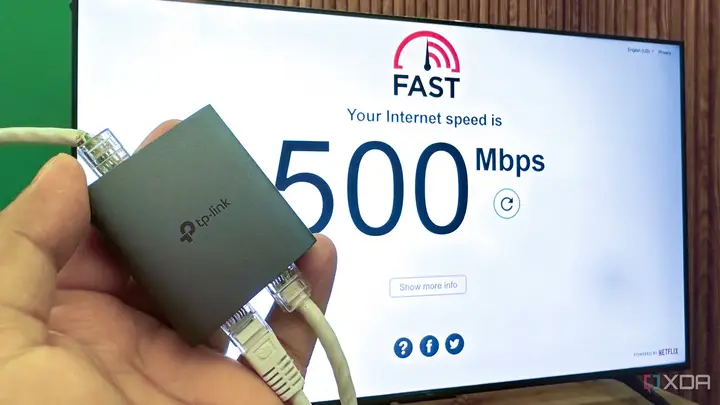
Ethernet is usually the faster and steadier choice at home, but several users report wired links that run slower than Wi-Fi. A reviewer testing a smart TV found this with his own setup, and a tech explainer on Engadget lists the usual causes. The problem does not always sit in the cable.
The first case comes from a personal test reported by XDA Developers. The writer streamed PC games with Moonlight and ran an Ethernet cable into a TCL 4K Mini-LED TV. The connection gave about 100Mbps on Fast.com, although the internet plan was rated at 500Mbps. Wi-Fi on the same TV had reached 110 to 120Mbps. The wired link was still more stable for game streaming, with fewer drops and less delay.
The spec sheet did not help. The Amazon listing only says Ethernet, and the owner's manual shows a port without saying whether it is Fast Ethernet at 100Mbps or Gigabit at 1Gbps. The writer compared it with the manual for an LG C5, which lists one port and no speed. The reviewer says this is common, since most TV buyers rely on Wi-Fi and makers focus on wireless speeds.
A network switch confirmed the bottleneck. When the TV and a PS5 Pro were connected through a 1-to-2 Gigabit splitter, the console received the full 500Mbps, while the TV stayed at 100Mbps. The writer then tried a $10 USB 3.0 to Gigabit Ethernet adapter. It only works if the TV supports network over USB, and the reviewer says many smart TV systems, including Tizen and webOS, do not recognise standard USB adapters as network interfaces. A USB 2.0 port would also cap the speed.
The Engadget explainer, a general guide, lists several other reasons for a slow wired link. Old or cheap cables, such as copper-clad aluminium, can cap speed, and Cat5 or better is the suggested minimum. A damaged sheath or a badly twisted pair can also reduce throughput, and a faulty port may show no light at all. Outdated drivers, Energy-Efficient Ethernet on Mac and Windows, and power saving on Windows network adapters can slow things down. Malware, including cryptomining code and router infections such as VPNFilter, can use up bandwidth. An ISP may also apply a speed cap, which can be checked by comparing wired and wireless tests.
The two reports describe different cases. The XDA case is a hardware limit in one TV model, while Engadget gives a checklist for any home network. Neither source says how many TV models are affected, and neither measures how common the problem is.
What is still unknown: whether other TCL or LG models share the same port limit, and which TVs support USB networking. The writer did not name the exact adapter model or test it beyond the one TV. Readers who stream games or move large files should check the port speed in the manual or with a speed test before they buy new cables or adapters.
For most people, a 100Mbps wired link is enough for standard streaming. According to the reviewer, Netflix recommends about 25Mbps for smoother 4K. Wired speed matters more for local game streaming and large file transfers.
Enjoying this? Get the Gadgets brief
Every Monday: the gadgets worth your money.
✓ Free · seven editions · one click to leave
How each source covered it
Original reporting by the sources above. Summary by smart-home.space.