GadgetsNews wire, 1 h ago
Flat Ethernet cables can bring wired internet to a rented flat without drilling
Reported by How-To Geek
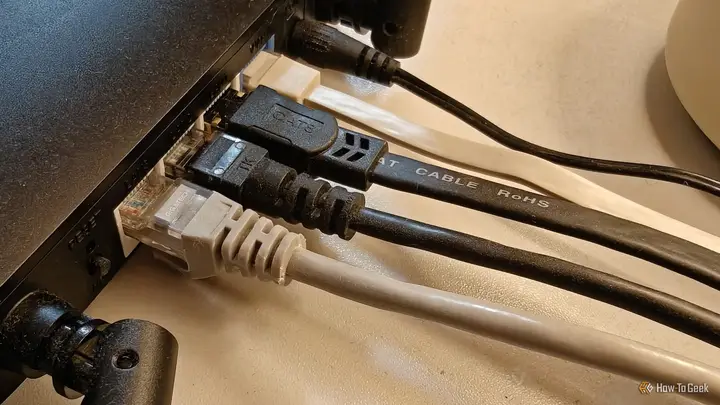
A reader with a desktop PC in a rented apartment wanted a wired connection, but the router sits in the kitchen, far from the office. The writer could not drill holes or run cables openly through the walls. Instead, he used a flat Ethernet cable and hid it under carpets and through gaps around the doorways. The account, published on 28 November 2026 by How-To Geek, is a first-person how-to piece rather than a product launch or a test.
The layout is a common problem in older homes. The Wi-Fi router and the ISP modem both sit in the kitchen, because the modem is wired there. Moving them would mean the provider running a new coaxial line to another room. The flat also has few power outlets, and the office had too few to take a home server that would have to move with the router. The writer also rejected Wi-Fi for the desktop, citing slower speeds and an uneven signal over longer distances.
The route he used runs from the router under the kitchen carpet, through the hallway and into the office. From there the cable runs under furniture and under the desk to the back of the PC. He says most of the run is hidden under carpet. The article notes that a round cable is easy to feel underfoot, and that a round cable may not fit through the narrow gap between a door and its frame. A flat cable is thin enough to pass both obstacles.
The article addresses a common concern about flat cables. Some people think they resist interference and crosstalk less well than round cables. The writer explains that round cables allow twisted pairs to be twisted against each other, use internal separators and shielding, and often have a plastic spline. Flat cables lay the pairs side by side, and cheap versions use thinner conductors and weaker jackets. The writer says he has not seen any difference in online games or calls compared with his old round cables.
The main advice is about quality. Wires that are not twisted correctly can make interference and crosstalk worse. A thin, flimsy outer jacket leaves the cable more open to damage. The writer does not name brands, give measured speeds or list the cable category he used. The result rests on one user's experience in one flat, and the article does not claim that flat cables perform the same as round ones in every setting.
For readers with a smart home, the point is practical. Many hubs, cameras, TVs and home servers work better on a wired link than on Wi-Fi, and the wired link does not need to be routed through open walls. A flat cable can be a low-cost way to reach a desk, a media device or a server rack in a rented home, where drilling is not an option. The article describes this as an alternative to choosing between holes and Wi-Fi, and it encourages readers to try the cable before dismissing it.
Still unknown from the source is how the cable performs over a long run, at high speeds, or in a home with many electrical devices. Readers who want to try it should check the jacket and the twisting of the pairs before buying, and should test the link speed on the desk after installation.
Enjoying this? Get the Gadgets brief
Every Monday: the gadgets worth your money.
✓ Free · seven editions · one click to leave
Original reporting by the sources above. Summary by smart-home.space.