GadgetsNews wire, 13 Nov 2026
HP OmniBook 5 14 review: a budget Windows laptop with OLED and long battery life
Reported by Tom's Guide, How-To Geek
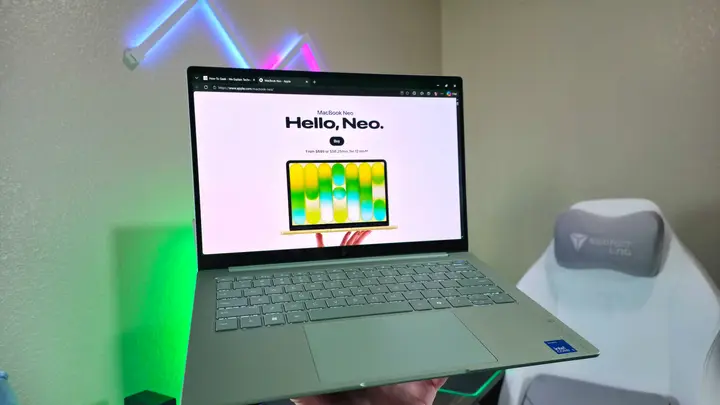
HP has released the OmniBook 5 14 (2026), a budget Windows laptop that two reviewers position as a direct alternative to Apple's MacBook Neo. Tom's Guide and How-To Geek both tested the machine and reached a broadly positive verdict, with reservations about the display, the camera and the base configuration.
The laptop has an all-aluminum body and comes in four colours. Tom's Guide gives its size as 12.3 by 8.62 by 0.46 inches and its weight as 2.5 pounds. The lid flexes slightly when pressed in the middle, but both reviewers found the chassis sturdy. How-To Geek describes the build as premium for the price and says Apple still has a slight edge in overall build quality. Both praise the keyboard, which has spacious backlit keys and firm key action. The touchpad is large enough and responds well.
The 14-inch screen is an OLED panel with a 1920 by 1200 resolution. Tom's Guide measured an average brightness of 272 nits, a little below the 300 nits HP markets. The panel does not support HDR, which the reviewer called odd for an OLED display. How-To Geek notes a 60Hz refresh rate, lower than the 120Hz of the Dell XPS 13, and says the colours and deep blacks make up for the lower resolution. It also wishes the panel were brighter. Only the touch configurations have a touchscreen, and the laptop has no stylus support.
Tom's Guide reports a battery life of nearly 20 hours and says the machine handles everyday work well, including many open browser tabs and light photo editing. In the Geekbench 6 CPU test, its scores are close to those of the Dell XPS 13, which uses the same Intel chip and memory. Its SSD speeds and video transcoding results are lower. The reviewer found the MacBook Neo faster in CPU tests, despite having only 8GB of memory. Graphics performance is modest, and the laptop is not meant for demanding games. How-To Geek describes all-day battery life and reliable everyday speed, but warns that 8GB of memory can hold back heavier use.
The ports differ between the two reviews. Tom's Guide lists one HDMI port, two USB-C ports and one 3.5mm headphone jack. It notes that both USB-C ports run at USB 3 speed and that either can charge the laptop. How-To Geek describes a full-size HDMI 2.1 port and says the keyboard has multi-level backlighting. It also reports face login on every configuration. Both reviewers agree the speakers are thin, though How-To Geek found them clear enough for music and video. Both criticise the 1080p webcam, which Tom's Guide calls grainy and How-To Geek says struggles in low light.
Prices vary by source. Tom's Guide gives a starting price of $649 on HP's website and says it was on sale for $599 at the time of writing. How-To Geek lists a starting price of $650. The base model has an Intel Core 5 315, 8GB of memory, 256GB of storage and no touchscreen. The reviewed units cost $749 in Tom's Guide's test and have an Intel Core 5 320, 16GB of memory, 512GB of storage and a touch display. How-To Geek sees the $700 to $900 range as the best choice for most buyers. It advises buying directly from HP, because the company offers more configuration options there, and says HP plans to add more display, memory, storage and chip options later. How-To Geek also notes that the laptop has already had several sales.
The reviews point to students and people who need a reliable laptop for casual use. Neither source tests the laptop for heavy creative work or long-term reliability. The price and sale periods are not confirmed beyond the dates the reviews were published, so readers should check HP's website before buying.
Enjoying this? Get the Gadgets brief
Every Monday: the gadgets worth your money.
✓ Free · seven editions · one click to leave
How each source covered it
- Tom's GuideHands-on verdict focused on design, the OLED screen, benchmark results against the MacBook Neo and Dell XPS 13, and battery life.13 Nov 2026
- How-To GeekValue-for-money case focused on build quality, the sweet-spot configurations, buying direct from HP, and the trade-offs in memory and display.5 h ago
Original reporting by the sources above. Summary by smart-home.space.