GadgetsNews wire, 9 h ago
iPhone Significant Locations & Routes: how to check, pause or clear your data
Reported by How-To Geek
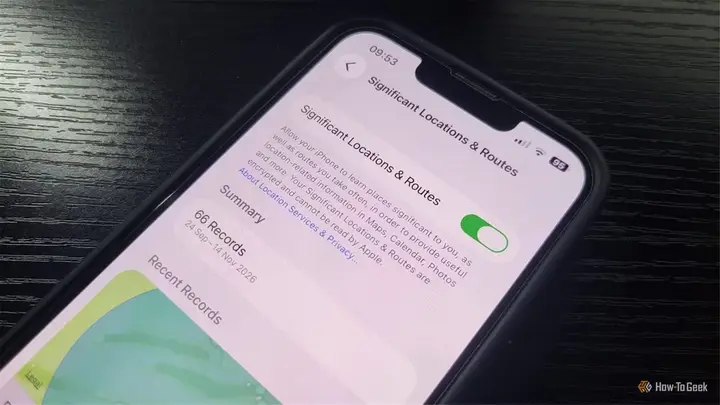
A How-To Geek writer, Tony Phillips, found that his iPhone had stored 66 location records in a feature called Significant Locations & Routes, yet the screen showed him only one recent place. He describes the feature as a record of the places a phone's owner visits and the routes taken between them.
The feature is in Settings, under Privacy & Security, then Location Services, then System Services. Opening it requires Face ID. The writer saw a summary of 66 records covering a date range from 24 September to 14 November. Below it was one recent entry on a map. The place matched somewhere he had visited several times.
The writer found no list or other page for browsing the older entries. He zoomed in and out and checked for extra screens, but none appeared. The map showed a broad circle rather than an exact point, so he was unsure how precisely the stored data identifies a place. He also turned on Visited Places in Maps, a separate Apple feature, but it did not reveal anything more about the 66 records.
Apple's own documentation says that an iPhone, and other devices signed in to iCloud with the same Apple Account, keep track of places a user has recently been, how often and when they went there, and the routes taken to reach them. The aim, according to Apple, is to learn which places and routes matter to that user. Apple says the information supports personal services, such as building Memories in Photos and suggesting predicted routes.
Apple also states that Significant Locations & Routes is synced between a user's devices with end-to-end encryption, and that Apple cannot read it. The writer points out that this claim covers this feature specifically. Other location services may handle data in a different way, so readers should check each one separately.
The article leaves important questions open. Neither Apple's documentation nor the iPhone screen explains what counts as a record. It is not clear whether each record is a visit, a significant place, or something else. The writer could not see the individual entries, so he could not check what the 66 records contained.
The writer did not switch the feature off himself. He lists cases where turning it off makes sense. One is when a user does not want the phone to learn their regular places. Another is when a user does not use the personalised features it supports. A third is when someone wants to keep as little location data on their devices as possible. A fourth is when a user prefers not to store this kind of data at all, even with Apple's privacy protections in place.
The feature can also share information with compatible apps. Visited Places and Preferred Routes & Predicted Destinations can be shared, but only when the user turns on the relevant sharing options.
To stop future collection, go back to the same settings path and turn the feature off. Turning it off does not delete what is already stored. To remove existing data, tap Clear History. According to the article, Apple says clearing this data removes it from every device signed in to the same Apple Account. Clearing can also reset personalised features, such as predictive traffic routing, so the phone will need time to learn again.
The writer found the 66 records eye-opening and suggests that readers check their own iPhones. The source text ends partway through a sentence, so this story covers only the points that were available to us.
Enjoying this? Get the Gadgets brief
Every Monday: the gadgets worth your money.
✓ Free · seven editions · one click to leave
Original reporting by the sources above. Summary by smart-home.space.