GadgetsNews wire, 47 min ago
Projectivy Launcher strips ads and clutter from the Google TV home screen
Reported by How-To Geek
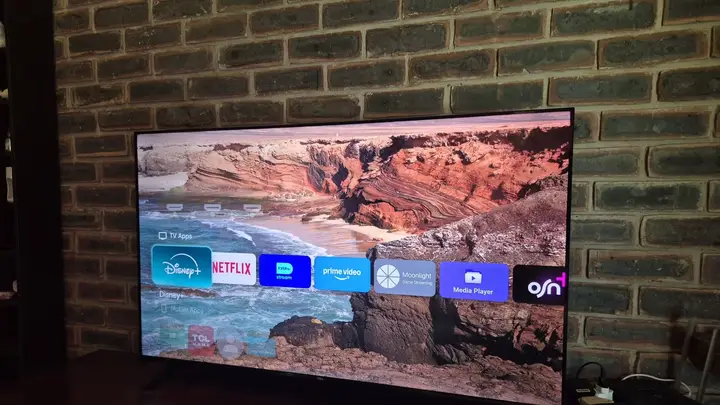
A reviewer at How-To Geek says a free launcher app removed the ads and clutter from the home screen of a Google TV. The reviewer had been looking for an alternative for some time. The author used a TCL television, which is not a recent model, and found the default home screen slow and hard to look at. The biggest complaint was the first row of recommended shows, which was mostly sponsored content the author had no interest in watching. The author also said the recommendations were rarely useful.
The app is Projectivy Launcher. It is available directly from the Google Play Store, so no sideloading is needed. It is a freemium app: its core features are free, while some expanded controls need a one-time purchase of $7.49. According to the reviewer, the layout stays close enough to the standard Google TV look that it does not feel strange. The rows are simply organised in a more intuitive way, and the home screen is completely ad-free, so sponsored and promotional rows are removed.
The reviewer reports that the launcher also runs more smoothly than the default screen. Even though it has more features, scrolling felt less laggy after some time of use. The launcher can also take over the home button on the remote. After enabling the accessibility settings and an override toggle, the remote's home button opens the app directly. Some manufacturers lock the home button more strictly, and the article suggests a button-remapping app as a workaround.
The free version gives users a fair amount of control. They can group apps into custom rows, change icon sizes and spacing, recolour icons, and hide apps they do not use. The premium version adds the option to change the wallpaper, use custom images or icon packs, and access expanded parental controls. The reviewer dislikes that parental controls are not part of the free version. Plug-ins are also available from the Play Store for deeper changes, but the author mainly kept the default setup and says the free version offers what they wanted.
What is not covered: the article describes one user's experience on a single TCL television. It does not test other Google TV devices or measure speed. It does not state how the developer funds the free version over time, or whether the price may change. The author has used the free version since the switch and says they will not return to the default screen. Readers who want to try it should check the current price, the permissions requested, and compatibility with their own device before installing.
Enjoying this? Get the Gadgets brief
Every Monday: the gadgets worth your money.
✓ Free · seven editions · one click to leave
Original reporting by the sources above. Summary by smart-home.space.