GadgetsNews wire, 2 h ago
Turning a Galaxy tablet into a portable PC with Samsung DeX and Sunshine
Reported by How-To Geek
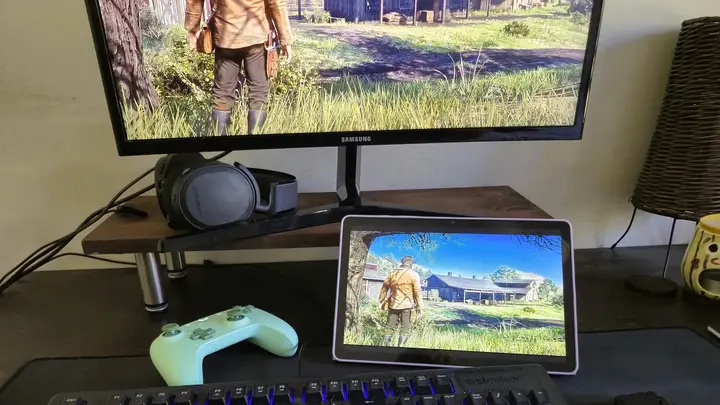
A How-To Geek writer describes using a Samsung Galaxy tablet as a portable PC, linked to a Windows computer at home. The writer's laptop had stopped working well, and rather than buy a new one, they used the tablet, a cheap USB-C dock and free software. The piece is a first-person account of one setup, so the results come from the author's own tests.
The base layer is Samsung DeX, the desktop-style mode on Galaxy devices. According to the author, DeX handled daily productivity work with ease, and a tablet needs no external display. A phone would need one. Portable displays are cheaper than a decent laptop, the author notes. Some apps did not fit the DeX layout or worked poorly with a mouse and keyboard, and the tablet's own performance was a limit.
To close that gap, the author added two tools. Sunshine is an open-source host that runs on the Windows PC. Moonlight is the client app, which the author installed on the tablet from the Play Store. The Sunshine installer came from its GitHub page, and the setup wizard asked which Windows gamepad drivers to use. In Moonlight, the tablet asked for a short PIN, and then the PC screen appeared on the tablet.
The author tested Red Dead Redemption 2 with a standard Bluetooth controller. The image was crisp, no settings needed tuning, and the latency was more than serviceable, the author says. The article also suggests that heavy work such as 3D rendering, video editing and animation could run on the PC and be driven from the tablet. The author does not report testing those tasks.
For use outside the home, the author warns that entering the PC's IP address in Moonlight without extra protection exposes the streaming port to malicious third parties. The author used Tailscale instead, which is a peer-to-peer VPN with a mesh architecture. After installing it on both devices and logging in with the same account, the two devices joined one private network. No router settings, firewall rules or port forwarding were needed.
The author lists several drawbacks. A slow internet connection is the most obvious limit, and it can make the experience frustrating. Some keyboard shortcuts conflict between DeX and Moonlight. The home PC must stay on and ready for a connection. Video decoding also drained the tablet's battery quickly. The author says the setup is still a work in progress and that tuning continues.
The article suits people who own an Android tablet and a Windows PC at home and need occasional desktop power while away. It does not give the price of the dock, name the tablet models tested, or say whether other host operating systems work. The report describes one user's experience, not a tested product or a formal comparison. Readers who want to repeat the setup should check the current versions and security notes of each tool before they start.
Enjoying this? Get the Gadgets brief
Every Monday: the gadgets worth your money.
✓ Free · seven editions · one click to leave
Original reporting by the sources above. Summary by smart-home.space.