GadgetsNews wire, 11 h ago
Turning a home turntable into a whole-house music stream with a Raspberry Pi
Reported by XDA Developers
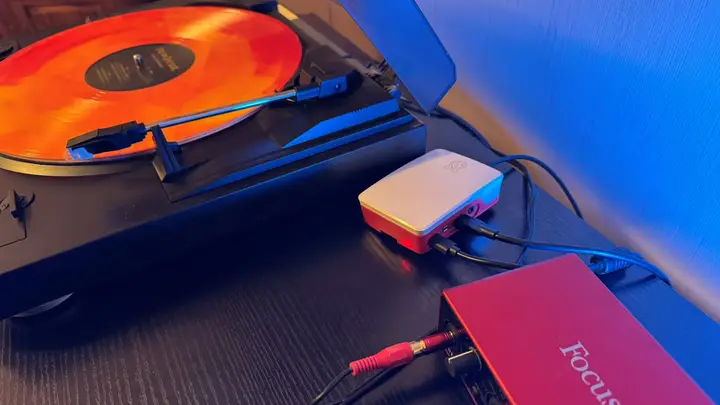
A writer for XDA Developers describes a home project that streams a record player's sound live to speakers in several rooms. The setup places a Raspberry Pi behind or beside the turntable and uses free, open-source software. The writer already digitised his records and played the files from a server. This project goes a step further: the music is streamed in real time while the record plays.
The hardware list is short. You need a turntable, a Raspberry Pi and an audio capture device. If the turntable has no built-in preamp, you also need a preamp. The writer used a Focusrite Scarlett 2i2 interface, which he had already bought for home recording. He connected the turntable's RCA outputs to the interface with two RCA-to-quarter-inch adapters, then plugged the interface into a USB port on the Pi. He used a Raspberry Pi 4 with a microSD card and installed Raspberry Pi OS Lite. He estimates the remaining parts cost around $100, depending on what you choose. The record player itself is the largest expense, and he left it out because he already owned one.
The software is also free. The writer logged into the Pi from a Windows PC over SSH and installed two applications. DarkIce captures the audio from the interface, encodes it and sends it to a streaming server. Icecast 2 runs that server and makes the stream available on the home network. He chose this pair over VLC, which he could have used for both jobs, because each tool does one task and troubleshooting is easier. He still used VLC as a client to connect the stream to other devices and to his AV receivers.
Once the software was configured, he opened a web browser, went to the Icecast stream and heard the live broadcast through his speakers. The player is minimal, with only play and pause controls. There is a delay between the sound from the record and the sound from the speakers. The writer says that delay is useful when he needs to leave the room without lifting the tonearm. He can also open the stream on his phone and send it to different speakers. Because the Pi sits out of sight, the whole setup can stay behind the turntable or beside it.
Audio quality is a limit. The stream is encoded as MP3. DarkIce uses 192 kbps by default. The writer says he can edit the DarkIce configuration file and raise the bitrate to 256 or 320 kbps to keep more detail. The default setting therefore does not match the full quality that many listeners expect from vinyl.
The article does not say how long the delay is, and it gives no full step-by-step configuration. The writer reports results from his own home only. It does not describe testing with several turntables, other audio interfaces or other network setups. The cost figure is his estimate, not a price list. Readers who want to copy the project will need to work out the exact settings and check that their turntable outputs connect to their interface.
For anyone with a turntable and a multi-room audio system, the project shows one route to share a record across the house. It is a personal build, not a product, and it depends on basic networking and command-line skills. The writer presents it as a fun way to bring back records he had not played in years, and as a way to listen without being in the same room as the player.
Enjoying this? Get the Gadgets brief
Every Monday: the gadgets worth your money.
✓ Free · seven editions · one click to leave
Original reporting by the sources above. Summary by smart-home.space.