Smart HomeNews wire, 3 h ago
Turn an Old Android Phone into a Smart Bedside Clock with Home Assistant
Reported by How-To Geek
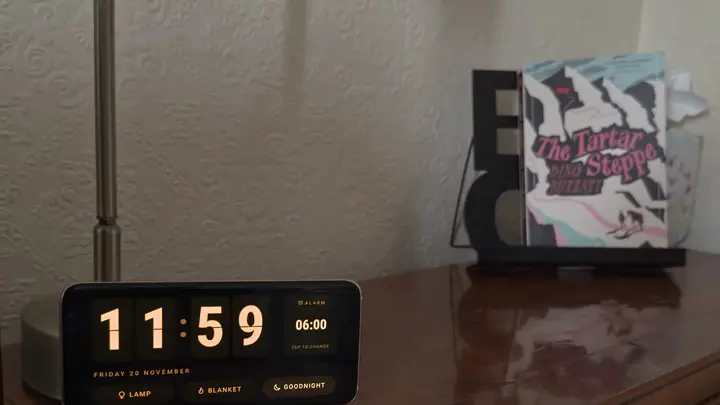
How-To Geek, in an article dated 20 November 2026, argues that an old Android phone makes a better bedside clock than a smart display that costs about 50 dollars. The author says smart displays are often locked down by the manufacturer. Clock face choices are limited, brightness is hard to control, and customisation is restricted unless the device is jailbroken.
An older phone already has most of what a bedside clock needs. It has a sharp screen, a responsive touchscreen, built-in Wi-Fi, an alarm function and a battery that keeps it running during a power cut. Because the owner controls the software, the phone can show much more than a plain clock.
For a quick setup, the article names ReteClock, an app designed for older Android phones. It shows a full-screen clock with the date. It also moves the clock face slowly around the display, which helps prevent burn-in, the permanent ghost image that static content can leave on some screens.
For more control, the author builds a custom clock face in Home Assistant and shows it on the phone through Fully Kiosk Browser. The dashboard includes smart home controls on the screen. From the clock, the author can switch off a bedside reading lamp and an electric blanket. A button runs the bedtime routine, and another section shows and changes the alarm set on the phone. The bedtime routine starts when the author taps an old credit card on the phone, which uses the card's NFC chip to trigger the automation. The author says the same layout would have been impossible on a stock Echo Show.
The phone's light sensor adds another feature. The Home Assistant Companion app gives access to the sensor readings. An automation sets the screen brightness according to how light the room is. In daylight the screen runs at full brightness so it is easy to read. At night it dims, so the clock stays readable without shining brightly enough to keep the sleeper awake.
The article is a personal account and tutorial. It does not give prices for ReteClock or Fully Kiosk Browser, and it does not list which Android versions each app supports. It also does not say how long a phone's battery stays healthy when it is kept on a bedside charger. Readers should check app requirements and the condition of their own phone before setting one up.
Enjoying this? Get the Smart Home brief
Every Tuesday: what changed in Matter, hubs and security.
✓ Free · seven editions · one click to leave
Original reporting by the sources above. Summary by smart-home.space.