GadgetsNews wire, 42 min ago
Five TV picture settings to check before you watch at home
Reported by Pocket-lint
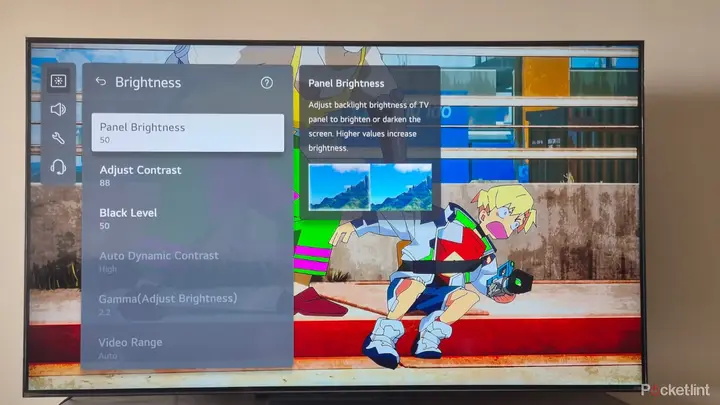
Pocket-lint published a personal guide on 24 November 2026 about getting better picture quality from a new TV. The writer says that sets on shop floors are often in store or retail mode. These modes raise brightness and colour saturation so the screen catches the eye under bright lights. At home, in ordinary room light, the same picture can look cold and unreal. The writer changes five settings on every new set. The steps shown use the menus of an LG TV.
The first change is HDMI Deep Color. It widens the number of colours a device sends to the TV, which helps 4K HDR content. Deep Color usually switches on by itself when a compatible device is connected, but the writer checks it for each input, including the Blu-ray player and the PS5. On an LG set it sits under external device settings in the general menu. The setting has to be enabled on every device, not once for the TV.
The second change is the picture preset. Every set includes presets such as Vivid, Cinema and Filmmaker mode. The writer first used Filmmaker mode but found colours too drab in documentaries. Instead, they run the personalised picture wizard from the picture menu. It shows six images at a time, and the viewer picks the two they prefer. The wizard covers sharpness, colour tone and temperature. The TV then applies the choices and saves them when the viewer confirms. The process takes longer than switching presets, but the writer says it pays off over time.
The third change is panel brightness. The writer says brighter is not always better. Too much brightness tires the eyes, while too little makes the picture dim. They set it near 50 percent and adjust it for the room. Black level comes next. If it is too high, dark scenes look grey and washed out. If it is too low, shadow detail disappears. The writer also keeps black level near 50 percent and moves it depending on content. On the LG set both controls are in the advanced brightness menu.
The fourth change concerns local dimming. Many modern TVs split the backlight into zones that brighten or dim on their own to improve contrast. The LG model offers Off, Low, Medium and High. The writer uses High. The fifth change is contrast, which sets the gap between light and dark areas. The writer usually leaves it near 80 percent, and says viewers should test what suits their own room.
The article is aimed at anyone who has just bought a TV, especially owners of sets connected to a Blu-ray player or a console. It gives no test results and no measured figures for any model. The steps are the author's own choices, and menu names may differ on other brands.
Enjoying this? Get the Gadgets brief
Every Monday: the gadgets worth your money.
✓ Free · seven editions · one click to leave
Original reporting by the sources above. Summary by smart-home.space.