EV & MobilityNews wire, 3 h ago
Four Google Maps and Spotify settings that improve Android Auto drives
Reported by How-To Geek
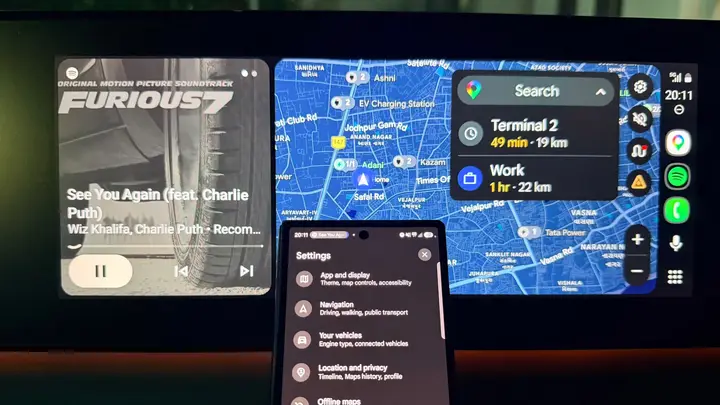
A How-To Geek writer describes four settings he changes in Google Maps and Spotify when he drives with Android Auto. The piece is a personal routine rather than an official announcement, so the advice reflects one driver's experience and not tested results.
In Google Maps, he raised the guidance volume from Normal to Louder. This lets him hear upcoming turns over music without lowering Spotify each time. He warns that guidance set too high can feel intrusive on familiar roads, so he aims for a balance that suits his car.
The article also covers a Gemini feature. Google's Personal Intelligence rollout for Android Auto lets Gemini in the car look up information from linked Google services. The writer used it to get a hotel address from an email while driving. He says it can also check calendar entries and places saved in Maps, so he does not have to search through his apps at the wheel.
In Spotify, he turned off Normalize Volume. This setting adjusts playback levels so that quiet and loud tracks sound more even. He prefers to control the volume himself, so he switched it off. The article does not explain how the change affects sound quality in different cars.
He also enabled Autoplay. When a playlist or album ends, Spotify keeps playing similar songs based on his listening history. Before this change, a short playlist called Jollygood Bollywood often ran out before he reached his destination, and he had to pick something else while parked.
The writer drives an electric car. For longer trips, he uses Google Maps to find compatible charging stations. The article does not describe how this works inside Android Auto or name particular stations.
What is still unknown: the article does not say which countries, languages or car models will get the Gemini feature, or when it will reach every account. It also gives no version requirements for the Personal Intelligence rollout. This story rests on one source, and we have not checked the rollout details with Google or with any other outlet. Readers who want to test the settings should check their own app versions first, since menu names and options may differ between releases and between phones.
Enjoying this? Get the EV & Mobility brief
Every Wednesday: charging, cars and costs.
✓ Free · seven editions · one click to leave
Original reporting by the sources above. Summary by smart-home.space.