EV & MobilityNews wire, 3 h ago
Android Auto hidden developer settings: what to turn on and what to leave alone
Reported by XDA Developers
A guide published by XDA Developers on 20 November 2026 lists six Android Auto settings that Google keeps out of sight. Most of them sit in a developer menu that is separate from the Developer Options on the phone itself. To unlock it, open the Android Auto page in the phone settings, go to the bottom of the list and press the version entry repeatedly until a notice confirms that developer mode is on. The same settings then appear behind the three-dot icon in the top right corner. According to the outlet, turning this on does not change the phone's own developer tools.
The first setting controls wireless connection. Google moved the toggle that once sat on the main page into the developer menu, but it still exists. The guide suggests turning it on if the wireless link keeps dropping. Drivers whose car only accepts a cable can switch it off, so that any wireless attempt is ignored. The article also notes that a number of phone owners have noticed quicker battery use and weaker links when they run wireless adapters in cars that accept only cables.
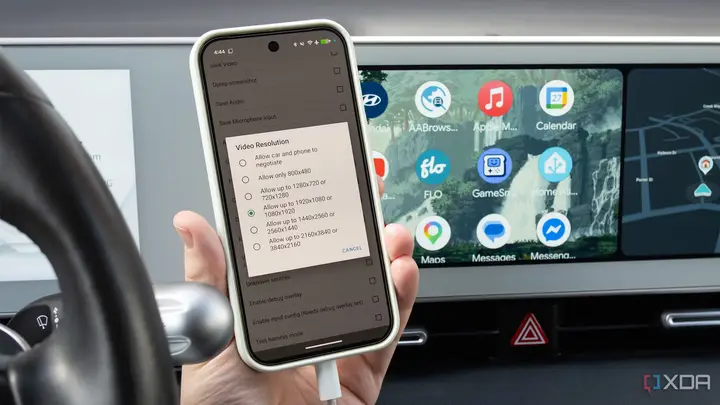
The second setting is Video Resolution. By default, the car and the phone agree on a resolution between them. Developers can force a higher value so the phone sends a sharper image that the car scales down, which the outlet calls supersampling. Choosing the closest exact match to the display's native resolution can fix problems on aftermarket head units and unusually shaped screens, where text and buttons look too large or too small. The guide also says a fixed resolution can help when a wireless link is unstable.
Audio is the third area. Over a cable, sound normally travels as uncompressed PCM, although the car may switch to AAC if its head unit requires it. Over wireless, the car typically falls back to compressed Bluetooth formats, including AAC, SBC and Qualcomm's aptX. The developer menu includes an Audio codec option where users can choose which format the phone should prefer. The listed choices are PCM, AAC-LC and AAC-LC with ADTS headers. The author argues that this helps avoid the lowest common setting between phone and car.
The fourth option concerns crash monitoring. By default, Android Auto shows an on-screen error whenever an app crashes or freezes briefly. A checkbox labelled Disable ANR Monitoring turns off that warning for momentary freezes in background apps. The guide says this suits users who find the alerts distracting, and it lets developers keep working on the interface while a background app fails. The article is aimed at people who know their system's quirks, and it notes that cheap wireless dongles can cause frequent freezes.
The fifth option allows apps from unknown sources. Apps from independent developers and alternative stores do not appear in the Android Auto app drawer by default. An Unknown Sources checkbox in the developer menu permits installing those apps, including unsigned beta builds. The guide warns that this does not fix every failed install, and that the developer's own instructions are usually the best guide. It also states that the toggle does not make an arbitrary app work with Android Auto. Apps still need to be built for the Android for Cars library.
The sixth tip is not in the developer menu. It sits in the phone's device settings and deals with wired connections that do not start. The article says the main Android Auto page does not show it by design. The text of our copy is cut off at this point, so the exact steps for this last option are not available to us.
Some points are not confirmed by the guide. It describes the author's own testing and experience, not independent measurements, so battery and sound effects will vary by car and phone. The article was written around the latest Coolwalk update, and menu names or behaviour may change in later Android Auto versions. Google has not commented on these menus in the material we received.
Enjoying this? Get the EV & Mobility brief
Every Wednesday: charging, cars and costs.
✓ Free · seven editions · one click to leave
Original reporting by the sources above. Summary by smart-home.space.