GadgetsNews wire, 44 min ago
A $20 PCIe card adds USB-C ports to an old desktop PC
Reported by XDA Developers
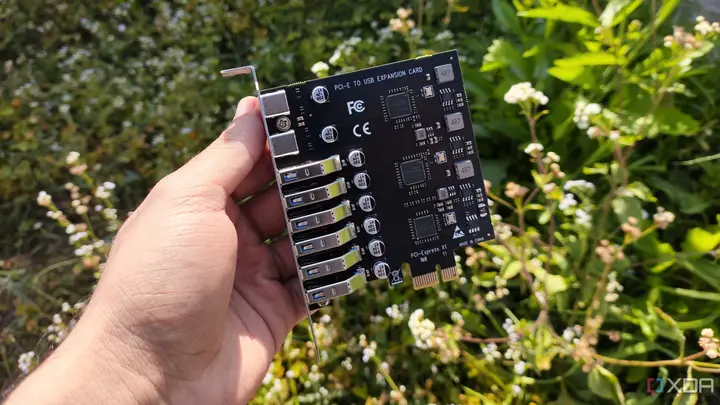
According to XDA Developers, a writer added a low-cost PCIe expansion card to an older desktop so it could use modern USB Type-C devices. The machine runs an MSI B450 A-Pro motherboard and serves as a second system in the writer's home. The board has no USB Type-C port at all, so the writer chose a card to fill the gap.
The writer had used Type-C to Type-A adapters for devices such as an audio dongle, a DIY storage enclosure and other gadgets. As more peripherals were added, the board ran out of spare ports, and the writer had to juggle several dongles. A new 4K webcam with a Type-C cable could not be plugged in without a free port, and the writer did not want to run it on a slower USB 2.0 connection.
The adapter costs roughly $20, according to the article. It offers two USB Type-C sockets and four USB Type-A ports. Its maximum speed is 5 Gbps, half the 10 Gbps found on more expensive boards. The writer says the Type-C ports delivered stable speeds in tests with the webcam and the storage enclosure.
Windows 11 recognised the card at once, with no driver search. The writer contrasts this with a network card in the daily PC, which needed drivers from the manufacturer's website. The article says the card needs only a PCIe Gen 2 slot, which is why it works in an older board.
The writer also bought a second card of the same kind for a Xeon home server. That server needed more ports for a Bluetooth dongle, a microphone, a drawing tablet and microcontrollers, which are passed through to virtual machines over USB.
The writer has added other cards as well. A cheap $15 network card brings 2.5 Gigabit Ethernet to the B450 board, which otherwise supports only 1 Gbps. Two TX-401 network cards link the daily driver and the Xeon workstation at 10 GbE for file transfers. The writer presents these upgrades as a cheap way to extend older machines without replacing them.
The article is one writer's personal experience. It does not include independent benchmarks, and it does not say how long the cards have been in use. Prices are approximate and may vary by region and over time. Readers with other boards should check the number of free slots and their PCIe generation before they buy.
Enjoying this? Get the Gadgets brief
Every Monday: the gadgets worth your money.
✓ Free · seven editions · one click to leave
Original reporting by the sources above. Summary by smart-home.space.