GadgetsNews wire, 4 h ago
Galaxy XR as a daily work PC: one writer's first four days with the headset
Reported by How-To Geek
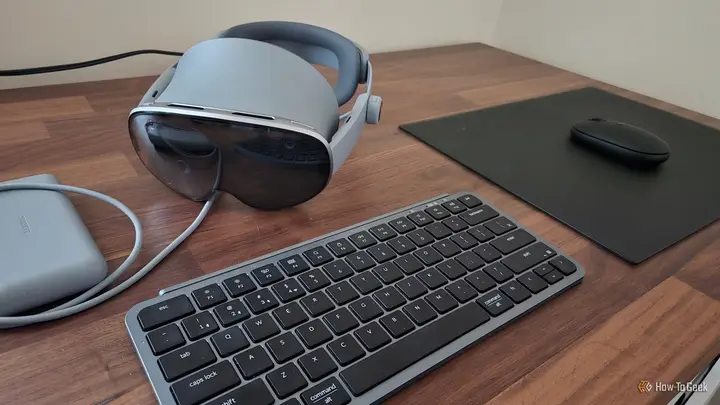
Samsung's Galaxy XR headset is being tested as an everyday work computer. In a first-person piece on How-To Geek, a writer who has used Android phones and foldables as a main computer for about two years says they bought the headset mainly for work, not for games. The writer calls it the most expensive computer they have owned, but says the purchase felt justified. The source does not give a price, so none is stated here.
The writer's route to the headset started with an Android phone connected to a lapdock or an external monitor. Later they used a used foldable phone with Samsung DeX, and then began working on the foldable's large inner screen. The writer says Android adapts across phone, tablet and desktop-style use, which kept them on the platform. Galaxy XR is described as an independent Android device with apps preinstalled and full access to the Play Store.
The article lists the main hardware. The headset has 256GB of storage and 16GB of memory. It uses a Snapdragon XR2+ Gen 2 processor and has a USB-C port for accessories. The writer describes it as the first headset to ship with Android XR. It runs nearly all Android apps as well as content made for XR and VR. The writer says the device allows sideloading of apps from outside the Play Store and has an unlocked bootloader. So far, the writer reports no lag or stutter and describes the display performance as smooth.
The writer's working setup uses several apps at once. A note app that syncs with their phone holds the draft. An outline sits in a project tool in a floating window, and a timer app runs to the side. Music plays from a streaming service because the writer has not yet copied a folder of MP3 files to the headset. For publishing, the writer uses Samsung Internet and has disabled Google Chrome. The main difference from a laptop is the space: windows can be placed anywhere around the user rather than fitted onto a flat screen.
The writer also reports a benefit for posture. Because the display sits where the eyes look, there is no need to adjust a screen to eye level, and the writer can lie or sit back on a couch to watch a video or join a call. One drawback is noted. The adjustment control on the back of the headset is not well placed for lying flat on one's back, although the writer still finds it more comfortable than a desk for long sessions.
Several points remain open. The writer's account covers only four days of use, and the writer says the verdict may change. The writer also says that problems in earlier augmented reality devices they tested are not present in this one, but the article does not compare the headset with other devices. The source does not state the price, battery life, weight, regional availability, or whether every work app behaves the same way. Readers should treat the account as one user's experience, not as independent testing.
Enjoying this? Get the Gadgets brief
Every Monday: the gadgets worth your money.
✓ Free · seven editions · one click to leave
Original reporting by the sources above. Summary by smart-home.space.