GadgetsNews wire, 2 h ago
Recreating Android 2.3 Gingerbread on a modern phone: what works and what does not
Reported by How-To Geek
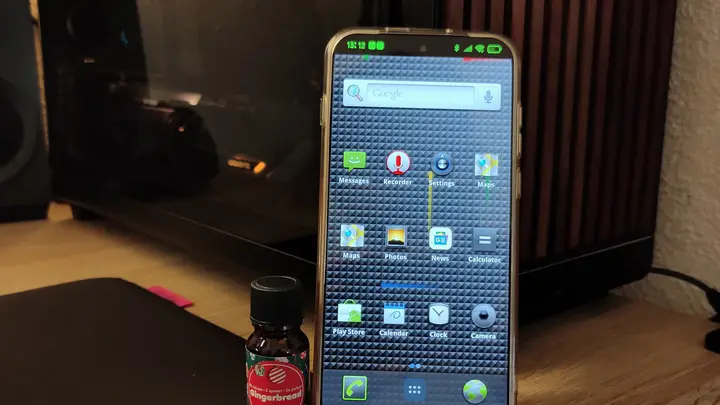
A How-To Geek writer set out to give a modern Android phone the look of Android 2.3 Gingerbread, the version many people first used around 2010. The test device was a OnePlus 15 running Android 17. The goal was to recall the feel of the Google Nexus S setup experience without losing the features, speed or security of a current phone. The project was a personal experiment, and the verdict is the writer's own.
The writer set ground rules first. There was no root access, no custom ROMs and no sideloaded apps that ask for Accessibility permission. A GitHub project that copies the Gingerbread CRT screen-off animation needed that permission, so it was left out. Reference material included the Android Time Machine site, old videos and period reviews. Each visual element was checked against those references and rebuilt where possible.
Most of the look came from third-party apps. Nova Launcher handled the grid size, a custom dock and the icon replacement, using a Gingerbread icon pack from XDA Forums. It could not reproduce the vertical 3D scrolling in the app drawer. Nexus Revamped was tried for the live wallpaper, but it offered the older Froyo grid style instead of the Gingerbread waves. After more than an hour, the writer found no workaround. Neo Status Bar gave an approximate green-on-black status bar. HeliBoard replaced Gboard as the keyboard because it allowed closer styling, although the raised key effect could not be copied.
System settings added more of the look. Enhanced Dark Mode made system apps almost black, a neon green accent colour was applied across the interface, and the Droid Sans font was installed. The writer said the end result was more or less what had been hoped for, with an old-school feel each time the phone was switched on.
The project was harder than expected. The stock Gingerbread widgets were missing. These included the black-and-green analog clock and the Power Control widget, which let users toggle Wi-Fi, Bluetooth, GPS and other settings from the home screen. The writer could not find user-made Gingerbread widgets in KWGT. Attempts to build them with AI-generated code also failed. The article notes that Quick Settings in the notification shade only arrived with Android 4.2, so the lack of a home-screen toggle panel was felt keenly.
The writer's conclusion is that modern Android offers more built-in personalisation than ever, through Material You and first-party theme stores. Recreating an older version is still difficult. Customisation is spread across many apps, and some of them have been abandoned for years and must be sideloaded. The writer suggests focusing on the wallpaper, icons and font, the elements that carry most of an old version's character, rather than aiming for a full copy.
The article does not say how long these apps will be maintained. It also does not test the same setup on other phone brands, and Gingerbread itself looked different across manufacturers, so results on other devices may vary.
Enjoying this? Get the Gadgets brief
Every Monday: the gadgets worth your money.
✓ Free · seven editions · one click to leave
Original reporting by the sources above. Summary by smart-home.space.