GadgetsNews wire, 6 h ago
Windows keeps old Wi-Fi passwords on your PC; here is how to check and clean up
Reported by XDA Developers
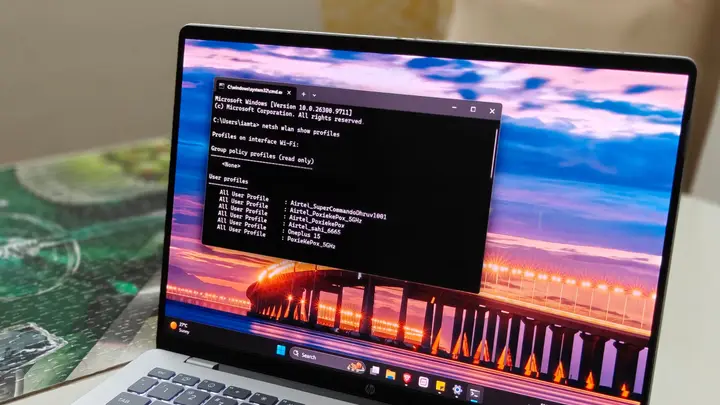
XDA Developers reports that a Windows PC keeps a saved record of every Wi-Fi network it has joined, and that one more command can show the password for each of them. The writer ran the check on a PC used for several years and found saved profiles for networks he had forgotten, including old apartments, workplaces, hotels and family homes. The article was published on 25 November 2026.
The first step is a command typed into Command Prompt that lists the saved wireless profiles. On its own, this list shows only the network names. The writer says it is a quick way to see what Windows still remembers.
The second step adds a profile name and a switch called key=clear to the same tool. Windows then prints the stored settings for that network, including a Key Content field that holds the Wi-Fi password as readable text. The writer repeated this for other saved profiles and says the password appeared even for a network he had completely forgotten.
According to the article, each profile is also saved as an XML file in a system folder under ProgramData, with the files grouped by wireless adapter. Opening one of these files does not show a readable password. The key appears as an encrypted block instead. When the writer copied a profile file to a second PC, it did not work there, and the netsh command could not use it.
The writer does not treat the stored password as fully secure. Someone with access to the PC and enough permissions may still be able to retrieve a saved key using Windows tools. What can be returned depends on the authentication method used by each network and on the rights of the user. If a profile has been removed, there is nothing left to retrieve.
The article stresses that this is not a data leak or a security flaw. Windows keeps Wi-Fi credentials so that it can reconnect to networks automatically, and the command only shows information that the signed-in account is already allowed to access. The surprise, the writer says, is how long old profiles remain on the machine after the user has stopped using the network.
To clean up, the writer suggests deleting profiles for networks that are no longer used. The delete command also uses the exact profile name, so the name should be checked before removing anything. He argues that there is little reason to keep a profile for a network that has not been used for years. Before deleting, it is worth confirming that the network is not one you still visit, such as a holiday rental or a friend's home.
The writer ties the finding to a broader habit of Windows. He says he had forgotten half of the networks on the list, while Windows had kept their profiles quietly in place. He describes the behaviour as ordinary rather than sinister, and as one example of how much past activity the operating system records.
Several details are not covered. The article does not name the Windows versions tested, and it does not say how the behaviour differs across account types or managed work machines. It is a first-person account from one outlet, and no statement from Microsoft is included. Readers should treat the steps as a description of one test, not as a guaranteed result on every PC.
For a home network, the point is practical. Your Wi-Fi password may be stored on any Windows laptop or desktop that has joined your network, and old profiles can keep the passwords of places you no longer visit. Reviewing the saved list once a year is a simple habit that reduces what a shared or lost PC could reveal.
Enjoying this? Get the Gadgets brief
Every Monday: the gadgets worth your money.
✓ Free · seven editions · one click to leave
Original reporting by the sources above. Summary by smart-home.space.