GadgetsNews wire, 2 h ago
Windows can pin a laptop to slow 2.4GHz Wi-Fi; a hidden setting fixes it
Reported by XDA Developers
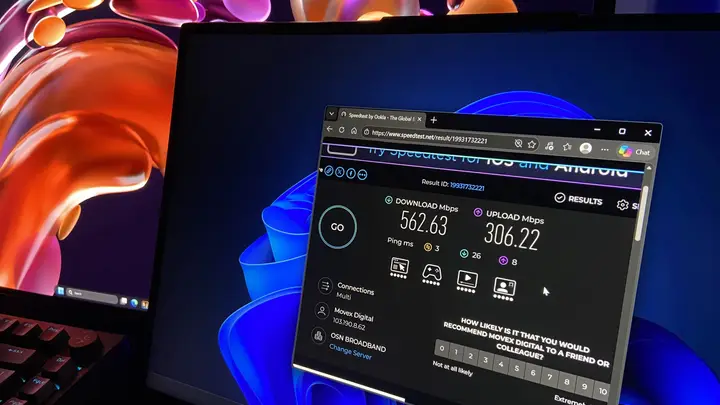
A reader reports that a Windows laptop was running far below its home internet plan, and the cause was the Wi-Fi band it chose rather than the provider. The laptop sits one room away from the router. Over the same connection, a desktop PC reached more than 400 Mbps, while the laptop averaged 93 Mbps down and 37 Mbps up, according to the author's own tests.
The author found that the Lenovo Legion 5 Pro's MediaTek Wi-Fi chip was using the 2.4GHz band. The router shares one network name across 2.4GHz and 5GHz. Windows judges the band by signal strength, and at this spot 2.4GHz read louder, with 81 percent signal against 66 percent for 5GHz. The author says the lower band loses less strength through walls, so it wins from the next room.
Signal strength does not show how much a connection can carry. The author reports that 2.4GHz showed a 300 Mbps link, while 5GHz had reached 866.7 Mbps in another room. The scan also found 26 of 40 visible networks on 2.4GHz, and eight of those on channel 11, which overlaps the channel 13 used by the router. Together, this crowding cut the real speed far below the link rate.
The fix is a setting called Preferred Band. It is found in Device Manager under Network adapters, in the Advanced tab of the Wi-Fi adapter. The default is No Preference. Changing it to Prefer 5GHz band made the laptop join 5GHz in all five reconnect tests, up from one in five before. The Wi-Fi drops for a few seconds while the driver resets.
After the change, the author's download speed averaged 222 Mbps, up from 93 Mbps, and upload rose from 37 Mbps to 128 Mbps. Latency under upload fell from 357 ms to 121 ms. The author notes that the same Speedtest server was used each time, from the same spot in the house. The laptop also runs Jellyfin and Immich, so upload speed matters for streams served to the home network.
The author also mentions a Band Selection option on the same MediaTek card. It can lock the adapter to 5GHz, but the author would skip it on a laptop because there is no fallback if 5GHz is not reachable. Preferred Band is only a preference, so the laptop can still use 2.4GHz where 5GHz is weak. Not every Wi-Fi card lists the option under the same name.
The article gives a command that works in PowerShell or CMD. It shows which band the adapter is on. The author suggests checking this before blaming the internet provider, if a device sits far from the router. The source does not say whether other Wi-Fi chips or driver versions behave the same way.
Enjoying this? Get the Gadgets brief
Every Monday: the gadgets worth your money.
✓ Free · seven editions · one click to leave
Original reporting by the sources above. Summary by smart-home.space.