Smart HomeNews wire, 2 h ago
Dead smart bulbs can be revived with ESPHome and a $6 ESP32 board
Reported by How-To Geek
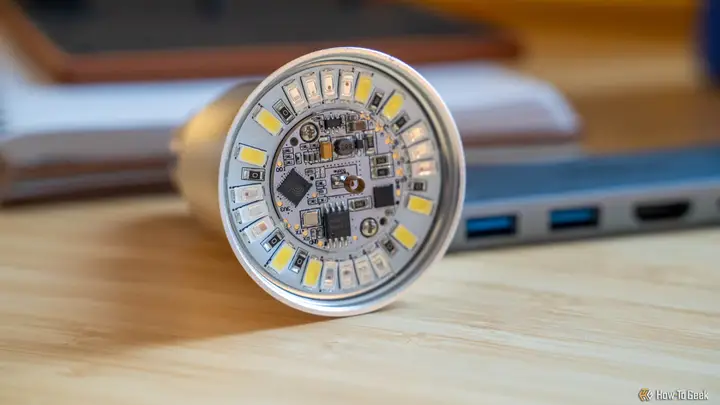
How-To Geek published a hands-on guide on bringing back a smart bulb that has stopped working. The author says most dead bulbs fail for one of two reasons: the maker has shut down the app that controls them, or the Wi-Fi module inside has failed. According to the article, both problems can often be fixed with a little soldering, a cheap board and custom firmware.
The first step is to open the bulb and identify its main chip. The author found that a bulb he believed used an ESP32 actually contained an ESP8266EX. Both chips come from Espressif, but the repair path differs. Other bulbs may contain ESP-WROOM-02, ESP-12, Beken BK7231 or other modules. Diagnosis matters. If the light never comes on, the LED driver or power supply may have failed, and the author says those parts are not worth saving. A failed Wi-Fi module or a closed cloud service, however, is worth fixing.
Safety comes first. The article says the bulb must be physically removed from its socket, not just switched off. Capacitors should discharge before any work starts. The board should never be connected to mains power while a USB adapter is attached. The diffuser dome is usually press-fitted, but some bulbs use glue, which needs heat and pry tools to release.
If the original chip still works, it can be reflashed. The author connects a 3.3V USB-to-serial adapter to exposed contacts on the board, which usually means soldering wires in place. Grounding a boot pin during power-up puts the chip into flash mode. Before writing anything, the stock firmware should be backed up with esptool so it can be restored later. The author recommends ESPHome with Home Assistant, because it is self-hosted and not tied to one vendor. If the chip has enough storage, over-the-air updates are possible. The author's board has 4MB. Some older Tuya bulbs can be reflashed without soldering using tuya-convert, but the article warns that this does not work on newer Tuya bulbs.
If the board is dead or cannot run ESPHome, the author suggests replacing it with an ESP32-C3. He puts its cost at about $6. The module is very small and has a USB-C port for flashing. It supports both Wi-Fi and Bluetooth Low Energy. Swapping the board means removing the old module and reconnecting power, ground and the PWM outputs that drive each colour channel. The article calls this a more demanding job, because bridged or badly made solder joints can damage the board or the bulb.
ESPHome then needs a configuration that matches the chip and the bulb. The author notes that each channel usually has its own PWM output, and the platform setting must match the chip, which differs between an ESP8266EX and an ESP32. The firmware is flashed over USB or through ESPHome's web tool, and later updates can go over the air where storage allows. Once flashed, Home Assistant can find the bulb and control it locally, with or without the manufacturer's app. The author argues that the revived bulb can end up better than the one originally bought.
Several points remain open. The guide reflects one author's experience and does not report tests across many bulb models. It does not give a full cost or time estimate beyond the board itself. Some bulbs need custom code, which the author says must be handled case by case. He suggests AI coding tools may help with that step, but he does not show results for them.
Enjoying this? Get the Smart Home brief
Every Tuesday: what changed in Matter, hubs and security.
✓ Free · seven editions · one click to leave
Original reporting by the sources above. Summary by smart-home.space.