Smart HomeNews wire, 11 h ago
Home Assistant can automate daily life without buying any extra smart devices
Reported by How-To Geek
Smart home software can run useful routines without any new hardware, according to a How-To Geek report published on 18 November 2026. The author argues that many helpful automations need only a smartphone and a platform such as Home Assistant. Built-in assistants and automation services offer narrower options, the article says, while open platforms allow more custom work.
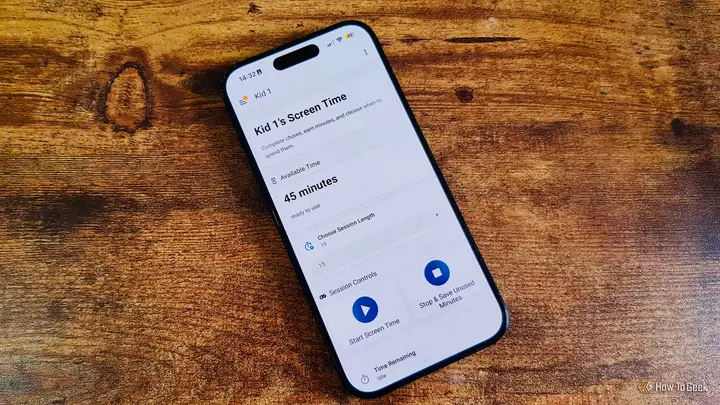
The first example is a chore tracker for children. The author uses a custom integration called KidsChore, or its newer successor ChoreOps, to show each child's daily tasks on a tablet. When a task is finished, the parents receive a notification on their phones and confirm it. Confirmed tasks earn stars, which children can exchange for pocket money, a sweet treat on Friday or extra time with screens. The author says this has ended the constant reminders at home.
The second example is a custom Pomodoro timer. Many standard apps use fixed cycles of four 25-minute blocks, but the author's version follows a personal rhythm. The author's own build uses a smart speaker to play music and announce breaks. The article points out that a phone alone can deliver the same alerts and even play music, so no speaker is needed.
The third example is a medicine reminder. The author takes two tablets each day and built a reminder in Home Assistant that sends actionable notifications on the phone. In the evening, alerts repeat about every thirty minutes and stop once the tablets are logged as taken. Reminders can be paused for a set period, and if the author is away from home, they can restart on arrival. The author reports not missing a dose since starting to use it.
Location settings add another layer. The medicine reminder uses critical alerts, which sound loudly even when a phone is silenced. That suits home but not a cinema. The author therefore runs a location-based automation that switches off loud alerts in set zones, using GPS to decide when the phone is in one. The same idea could bring up a shopping list when the phone reaches a grocery store.
Weather alerts can also be tuned. The author notes that phones often send repeated rain warnings, even when the user has no plans to leave the house. By linking a calendar to Home Assistant, weather alerts can be limited to times when an outing is scheduled. They can also be limited to the conditions the user will actually meet outdoors.
Calendar links can manage meetings too. On Android, an automation can switch on Do Not Disturb for the length of each meeting. On an iPhone there is no direct option. The article describes a workaround in which a specific text message to the phone triggers a shortcut that turns on Do Not Disturb.
Travel planning works in a similar way. Integrations such as Waze Travel Time estimate driving time from current traffic data. If a calendar entry includes the time someone needs to arrive, an automation can send an alert telling them when to leave. The author concludes that all of these examples need only Home Assistant and a smartphone, and that many useful routines do not depend on other devices.
What is still unknown: the article is a single first-person account, so the results are not independently checked. It gives no setup steps for the KidsChore or ChoreOps integrations and does not say how reliable the travel-time integration is across different routes or devices. It also does not say how the calendar and Do Not Disturb workarounds behave across iPhone updates.
Enjoying this? Get the Smart Home brief
Every Tuesday: what changed in Matter, hubs and security.
✓ Free · seven editions · one click to leave
Original reporting by the sources above. Summary by smart-home.space.