Smart HomeNews wire, 2 h ago
PhoneBox turns an old Android tablet into a desk dashboard for a home server
Reported by Ars Technica
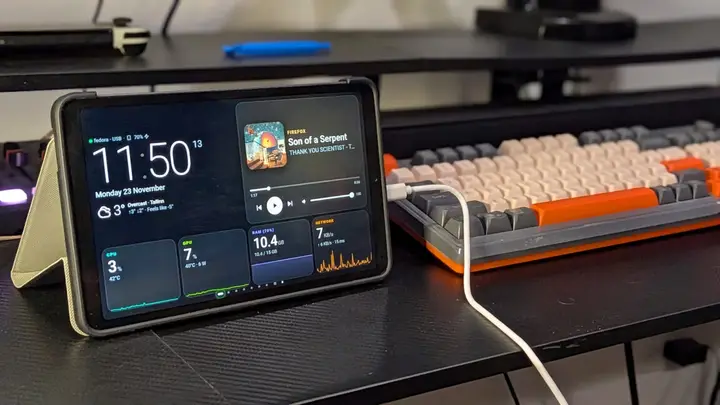
Ars Technica tested PhoneBox, a free and open source dashboard that turns an old Android tablet into a live display for a PC. The tool sends performance and diagnostic data from the computer to the tablet. It can also show extra pages with news, clocks, timers and smart home controls. The reviewer used version 0.9.29 on an AllDoCube iPlay 50 mini Pro tablet with an 8.4-inch screen.
Setup runs from one command in a Linux terminal, after the tablet is switched to developer mode and connected by USB. The script downloads the PC software, checks its checksum and asks a few yes or no questions. It can set up a background service on Linux that starts at login, and it can install the Android app for you. The script also prints an uninstall script before it finishes. According to the reviewer, the whole process took less than a minute.
The Android app is MIT-licensed and needs Android 5.0 or later. It is not on Google Play, so it has to be sideloaded.
The app offers a catalogue of 131 free add-on widgets. The reviewer said he had not tested most of them. Widgets are added as pages in a rotating layout. Examples include RSS news feeds, timers and world clocks. One widget lists installed Steam games and launches them on the PC with a tap. Another controls smart home entities hosted by Home Assistant. The reviewer said he could switch the lights in his office within seconds of adding that widget.
Layouts are changed in the PC's web interface, and changes appear on the tablet almost at once. In the reviewer's first run, the weather location showed a city that was not his. He found that the setting sits in the general user preferences, not inside the widget itself. He called it a small hiccup rather than a serious problem.
Wireless pairing did not work in his tests. The documented method uses a QR code shown in the web interface, which the tablet's camera should scan. The tablet refused each attempt, and the app has no built-in scanner. USB pairing worked well. Anyone planning a wireless-only setup should expect possible trouble.
On Windows, the PC companion app is not code-signed. Users may see a SmartScreen warning during installation.
The reviewer also pointed to a high-severity security advisory that the project published on November 20. It covered version 0.9.23 and earlier. The flaw could let another app on the Android device run commands or read stored credentials from the host PC. The reviewer said the problem was no longer present in version 0.9.29. He also noted that the project is early and releasing often, and he expects the rough edges to be smoothed out before a 1.0 release.
The reviewer's verdict is positive for anyone with an old phone or tablet. He spent nothing and now uses the tablet as a secondary desk display. The tablet draws power from a dedicated USB port on his PC and sleeps when his main monitors sleep. Because the app has deep system access, users should install it with care and keep it updated.
Still unknown: whether the wireless pairing problem is fixed, the release date of version 1.0, and how the widget catalogue performs across many different devices and setups.
Enjoying this? Get the Smart Home brief
Every Tuesday: what changed in Matter, hubs and security.
✓ Free · seven editions · one click to leave
Original reporting by the sources above. Summary by smart-home.space.