Smart HomeNews wire, 21 Nov 2026
Turn an old Android phone into a free Spotify Connect speaker with LibreThing
Reported by XDA Developers
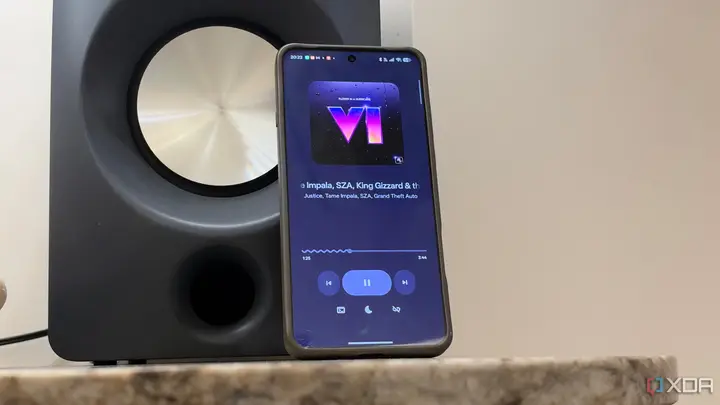
XDA Developers writer Dhruv Bhutani describes how he turned a spare Android phone and an old pair of bookshelf speakers into a Spotify Connect music player for his kitchen. He says the setup cost nothing. The method relies on LibreThing, a free open-source Android app. The report was published on 20 November 2026.
The problem was simple. A small Google Nest Mini did not offer the sound quality he wanted, and a larger display speaker such as the Echo Show felt too bulky for plain stereo playback. A dedicated kitchen system would have cost hundreds of dollars. He wanted to use hardware he already owned instead.
LibreThing turns an old phone into a dedicated Spotify Connect receiver. The phone does not need Bluetooth pairing, and the Spotify app does not need to stay open on it. Instead, the phone appears as a device in the Spotify Connect list. Playback can start from any Spotify device on the same network, and the music then continues without hands-on control.
According to the article, LibreThing is built on go-librespot, an open-source implementation of the Spotify Connect protocol. The developers packaged that engine into a single APK file with its own settings screen and a background service. The author says any phone running Android 7 or later should work, so a phone several years old is enough. The phone needs a network connection and a way to reach the speakers. A headphone jack works. If the phone has none, a USB audio adapter does the job.
Setup, as the author describes it, takes only a few minutes. You install the APK file from the project's GitHub page, tap the start button, and the device appears in the Spotify Connect list. Both the phone and the controlling device must be on the same Wi-Fi network. No sign-in is needed, according to the author. Once the phone is selected, its screen shows album art, track details and a progress bar. Playback can move from the kitchen speaker to another speaker elsewhere in the home. The author notes that podcasts and audiobooks work the same way. The app can also control playback from the phone screen. The author compares this to Spotify's discontinued Car Thing, which the project tries to recreate.
The app has several settings. A sleep mode turns the display black while audio keeps playing. The author uses this to protect the phone's OLED screen during long listening sessions. Other OLED protections include moving interface elements slightly over time and scheduled grayscale or red-only display modes. He says he does not need these in the kitchen but may use them in a bedroom. Playback quality can be fixed at a set level. LibreThing does not offer lossless audio, so the author chose 320 kbps, which he considers good enough.
The main audience is people who have an unused Android phone and some speakers. They can test a home audio setup without buying new hardware. The article is a personal account from one author, and it does not describe testing across many phone models. It also does not report on battery use during long sessions, on how the app behaves after phone updates, or on how stable the connection is over weeks of use. Because LibreThing is distributed as an APK from GitHub, readers should check the project's source and permissions before installing it on a device they rely on.
Enjoying this? Get the Smart Home brief
Every Tuesday: what changed in Matter, hubs and security.
✓ Free · seven editions · one click to leave
Original reporting by the sources above. Summary by smart-home.space.