EV & MobilityNews wire, 16 h ago
Six Android Auto habits that can weaken your drives, and how to fix them
Reported by XDA Developers
XDA Developers published a practical guide on 27 November 2026 that lists six Android Auto habits it says can reduce the quality of a drive. The piece is advice, not a product announcement, so no new feature or software release is involved.
The first habit is relying on mobile data alone. The author suggests downloading offline maps for the full route in Google Maps before leaving, and saving frequently visited areas permanently. Offline apps such as Organic Maps are also mentioned, since they need no advance download. Music can keep playing from a local app without a paid streaming plan. Without a connection, navigation, playback and voice commands can all stop.
The second habit concerns phone settings. Android's network switching can break the link to the car when the phone looks for a better Wi-Fi network. The guide recommends turning off the option that switches to better Wi-Fi networks. It also advises removing background restrictions for Android Auto, so the app is not suspended and navigation and media keep running.
The third habit is connecting by hand every time. Drivers who mainly use wireless mode can turn on automatic startup, so the system connects when the car door opens. Related options allow the system to start while the phone is locked and to start music automatically.
The fourth habit is staying on wireless for long journeys. Wireless links can fail to connect or drop out, and longer trips make such problems more likely. The guide suggests a wired connection for long drives and keeping a good data-and-charging USB cable in the car, preferably under three feet long.
The fifth habit is depending on voice commands. With Gemini now replacing Google Assistant in Android Auto, the author says drivers lean on voice more. Gemini Actions lets users pin custom actions to the launcher. One example is a route to the office, a calendar check and a favourite playlist, started with a single tap. Pinned actions also help when road noise disturbs voice recognition.
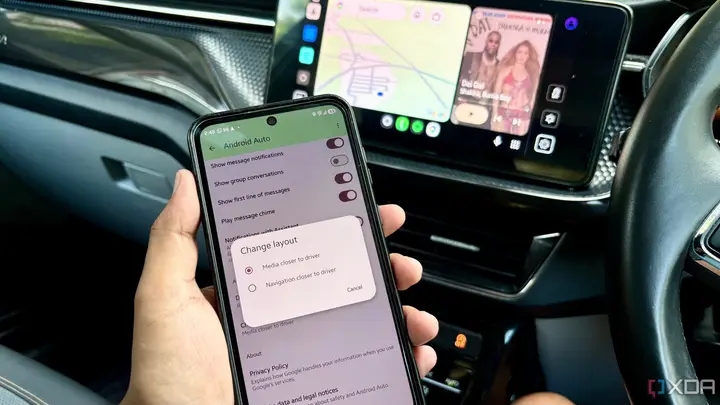
The sixth habit is keeping the default screen layout. In the Advanced settings, drivers can choose whether Media or Navigation sits closer to them in split-screen mode. The article notes that many users never change this default.
The central message is that most of these fixes take little time and need to be set up only once. The article does not present new test results or survey data. Its advice rests on the author's own experience and general knowledge of the platform. It does not state which phone or car models are affected.
Several points remain unclear. The source gives no figures on how many drivers face these problems. It also does not say whether setting names differ across Android versions or phone makers. Menu labels can vary by device, so readers should check their own settings before changing anything.
Enjoying this? Get the EV & Mobility brief
Every Wednesday: charging, cars and costs.
✓ Free · seven editions · one click to leave
Original reporting by the sources above. Summary by smart-home.space.