GadgetsNews wire, 2 h ago
Pitikapp turns an old Android phone into a PC performance dashboard
Reported by XDA Developers
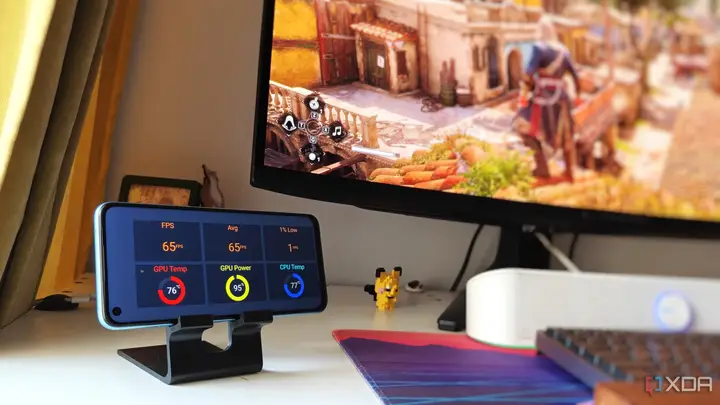
A reviewer at XDA Developers describes using an old Android phone as a live performance dashboard for gaming on a PC. The phone shows frame rate, temperature and power readings from the graphics card and processor, so the stats no longer sit on the gaming monitor. The report was published on 28 November 2026. According to the author, the setup cost nothing beyond a phone that was lying unused.
The author needed an on-screen display while testing settings or trying mods such as MFG Unlocker, which adds DLSS frame generation to an RTX 3080 card. Text overlays on the monitor were distracting. Instead of buying a small secondary screen, the author compared three apps for turning a phone into a remote monitor. Remote System Monitor locked its visual dashboard and custom layouts behind a fee. PhoneBox was free but needed more setup to read data from RTSS.
The author chose Pitikapp. Its Android interface looked plainer than the rivals, but the author said it worked after a short initial setup. The PC side is a Pitikapp Remote Dashboard app that includes a tutorial. The phone and PC apps find each other on the same network and connect automatically, and the phone can then be moved around the desk. Supported sources include MSI Afterburner, HWiNFO, GPU-Z, Fraps and Spotify, and several more.
Building the layout took about 30 minutes. There were no ready-made templates, so the author picked six sensors from the Afterburner list: GPU temperature, CPU temperature, power, frame rate, average frame rate and 1% low frame rate. Each widget can be given a shape, width, colour and position, and changes appear on the phone straight away. Widgets can be resized and dragged on the screen. The app can show gauges, switch between absolute and percentage values, and change colour at set thresholds. The author gave the example of a CPU temperature widget turning from yellow to red above 80 degrees Celsius.
The phone must stay awake for the dashboard to keep running, so the author set it to remain on. The old phone has weak battery life, so it is kept plugged in. The author also added Spotify, Steam and Discord widgets, which turns the screen into a basic stream deck. The author describes the app as deeper than first use suggests, and says only the surface was explored.
The report does not list minimum phone or Android requirements, and it describes only one test setup. It is a single first-hand account, and the author did not check the readings against other tools. Readers with other graphics cards should confirm which sensors their hardware reports to Afterburner before buying into the setup.
Enjoying this? Get the Gadgets brief
Every Monday: the gadgets worth your money.
✓ Free · seven editions · one click to leave
Original reporting by the sources above. Summary by smart-home.space.