GadgetsNews wire, 3 h ago
Ubuntu Server turns an old 2016 laptop into a home server
Reported by How-To Geek
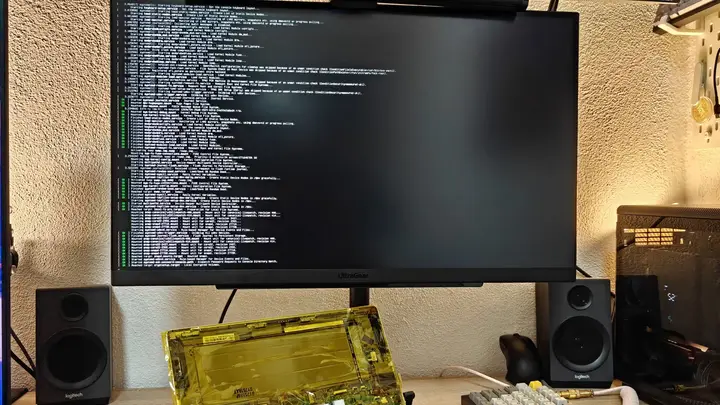
How-To Geek describes turning an old 2-in-1 convertible laptop into a headless home server running Ubuntu Server. The machine had sat unused for about two years. Its screen was cracked, and the author could not find an affordable replacement panel. The laptop was not worth selling, even for parts, so it was put away as e-waste.
The device is a Lenovo Miix 510 from 2016. It has an Intel Core i5-7200U processor, 4GB of RAM and a 128GB NVMe SSD. The article calls it underpowered by modern standards. Its two cores and four threads reach a maximum boost clock of 3.10GHz, and Windows 11 does not officially support the chip. The laptop ran hot even after fresh thermal paste. The screen began to go black at times, and the author cracked it while trying to reseat the display cable. The battery was also worn.
The author chose Ubuntu Server, a lightweight version without a graphical desktop. Everything is done through the command line. Setup was harder than expected because a black bar covered part of the display. A cheap USB-C hub with HDMI output solved that. After installation, the author checked system load with a few commands suggested by an AI chatbot. The system used only a few hundred megabytes of RAM and about 7GB of storage, and the CPU was almost idle. The author contrasts this with Windows, where Task Manager showed heavy use even with nothing open.
The server started with Docker and Jellyfin. Storage was limited at first, so a few flash drives held favourite shows. These could be streamed to a phone, a PC and a TV. The laptop struggled to transcode 4K video, even with Intel Quick Sync hardware transcoding turned on. Shows that played directly on the client ran smoothly. The author later added a 6TB external hard drive and installed Sonarr, Radarr and Bazarr to manage the media library. Immich was added for automatic phone photo uploads. AdGuard Home blocks ads and trackers across the network. Home Assistant runs the smart home.
The laptop handled this growing workload with little downtime or slowdown. Overheating was the main problem, especially in summer, as it had been under Windows. The author added heatsinks and a fan. The battery was removed to reduce the risk of swelling while the machine runs on mains power. The article presents these steps as the author's own choices rather than manufacturer advice.
The piece is one owner's experience, not a tested guide or a benchmark. It does not state the power use of the machine, the running cost, or how reliable the setup has been over a long period. It also does not say how the 4K limits affect day-to-day viewing beyond the examples given. Readers with spare hardware and some Linux comfort may find the approach useful. Readers who want a plug-and-play home server will need more planning, because the work is done by hand in the terminal and the hardware is old.
Enjoying this? Get the Gadgets brief
Every Monday: the gadgets worth your money.
✓ Free · seven editions · one click to leave
Original reporting by the sources above. Summary by smart-home.space.