Smart HomeNews wire, 6 h ago
Running Home Assistant, Pi-hole and Nextcloud at home: one month of use
Reported by How-To Geek
A reviewer spent one month running four self-hosted services on a home server: Portainer, Pi-hole, Home Assistant and Nextcloud. The account was published by How-To Geek on 21 November 2026. Its aim was to find out whether a home server could become useful without taking up constant attention. The author reports that, once everything was set up, the services needed little upkeep, and that each one handled a separate job in the household setup.
Portainer is a web panel for Docker containers. The author used it to see which containers were active, check their status and read logs without opening a terminal. Checking status, reading output and restarting a service were all possible from that one dashboard. The reviewer stresses that Portainer does not perform the tasks of the other applications. Its value lies in making them easier to run and watch. Before this, the author often had to recall commands for each check, so the panel removed that routine work.
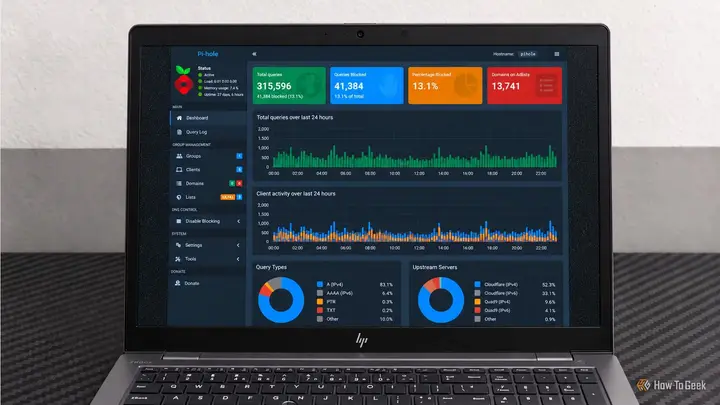
Pi-hole works at the network level as a DNS filter. After devices are pointed at it for name lookups, requests to domains on its blocklists are stopped before they reach their target. The author notes that this removes the need to install a blocking extension on each computer, phone or other supported device. The dashboard offers a query log and statistics that show which domains devices contact and how many requests were blocked. The report also states a limit: Pi-hole cannot reliably remove every advertisement, especially when ads and normal content share a domain.
Home Assistant gathers compatible smart devices and services in a single interface and lets users create automations. Routines can react to time, device states, sensor readings and other triggers. The author gives examples such as switching on chosen lights each morning, or turning off connected gear when the house is empty. After a routine is saved, it runs without the dashboard being open. The setup, however, takes patience, especially when linking devices and choosing the right integrations.
Nextcloud was the service the author found most useful for daily file work. It offers a browser interface for folders, uploads and documents, and an app ecosystem with calendars, contacts and collaboration tools. Storage stays on hardware the owner controls, which gives more say over where files are kept and how they are reached. The article points out the cost of this choice. Backups, updates, storage capacity and secure remote access all need planning, particularly for reaching files away from home.
The author's conclusion is that self-hosting does not have to mean many more applications to maintain. Updates, backups, security and occasional troubleshooting remain part of the routine, but the four services did enough useful work to justify the effort. The report is a single user's experience over one month. It does not include measured performance data, hardware specifications or costs. It is not clear from the article how the same setup would fare on other hardware or over a longer period.
Enjoying this? Get the Smart Home brief
Every Tuesday: what changed in Matter, hubs and security.
✓ Free · seven editions · one click to leave
Original reporting by the sources above. Summary by smart-home.space.