GadgetsNews wire, 46 min ago
Samsung Good Lock modules: how to customise lock screen, bars and home screen
Reported by XDA Developers
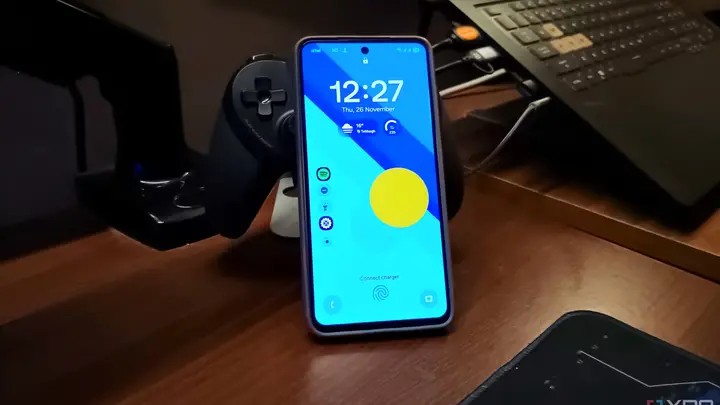
Samsung's Good Lock app adds a set of optional modules to One UI, the software on Galaxy phones. A reviewer at XDA Developers installed four of them on an older Galaxy S21 FE and described the results. The report is one user's account, not a formal test, and it focuses on how the phone looks and behaves rather than on new hardware features. Good Lock is free and is not a launcher.
The first change the reviewer made was to the lock screen, which in One UI offers only wallpapers and app shortcuts. The LockStar module adds widgets, so information such as a task list or calendar can be seen without unlocking. It can also show a collapsible list of favourite apps, plus shortcuts for the torch and Do Not Disturb, so there is no need to open the quick panel first.
The navigation bar is the next target. The default three-button bar can be changed with NavStar. Users can pick from a set of button designs, edit each icon, rearrange buttons and add an extra one, for example for screenshots. The bar height can be adjusted, and it can be hidden in full-screen apps. For people who prefer gestures, the module has a section for sensitivity, gesture handles and transparency of the bar area.
The Quick Panel, which holds Wi-Fi, Bluetooth and brightness controls, has little customisation in stock One UI. The QuickStar plugin changes its appearance and lets users add or remove items. Colours and blur levels can be set for the panel and for notifications, with a preview in dark and light modes. The Theme Park plugin handles the theme settings, and icon size and the top-bar indicators can also be changed.
The Home Up module offers the most change to the home screen. It goes beyond icon layout and adds looping pages, blur behind app icons during animations, and a way to open search by swiping down. Favourites can be hidden and the apps button moved. The reviewer uses it with the Task Changer option to show a slim list of recent apps instead of the card stack, which reduces swiping between apps.
Good Lock suits people who want more control over how a phone looks and feels, and it may help older handsets. The reviewer notes that some features may be missing on older One UI versions, so users should check their version before installing. The report does not say how the modules perform over long periods, how they affect battery life, or whether they work on every Galaxy model. Other modules mentioned include NotiStar for notification history and MultiStar for multi-window use.
Each module can be tried on its own, so a reader can test one feature at a time and go back to the standard settings if it does not suit them. The source does not describe how to undo every change, so readers should check each module's settings before relying on it for daily use. The reviewer focused on the lock screen, navigation bar, quick panel and home screen, which were the areas that mattered most to them.
Enjoying this? Get the Gadgets brief
Every Monday: the gadgets worth your money.
✓ Free · seven editions · one click to leave
Original reporting by the sources above. Summary by smart-home.space.